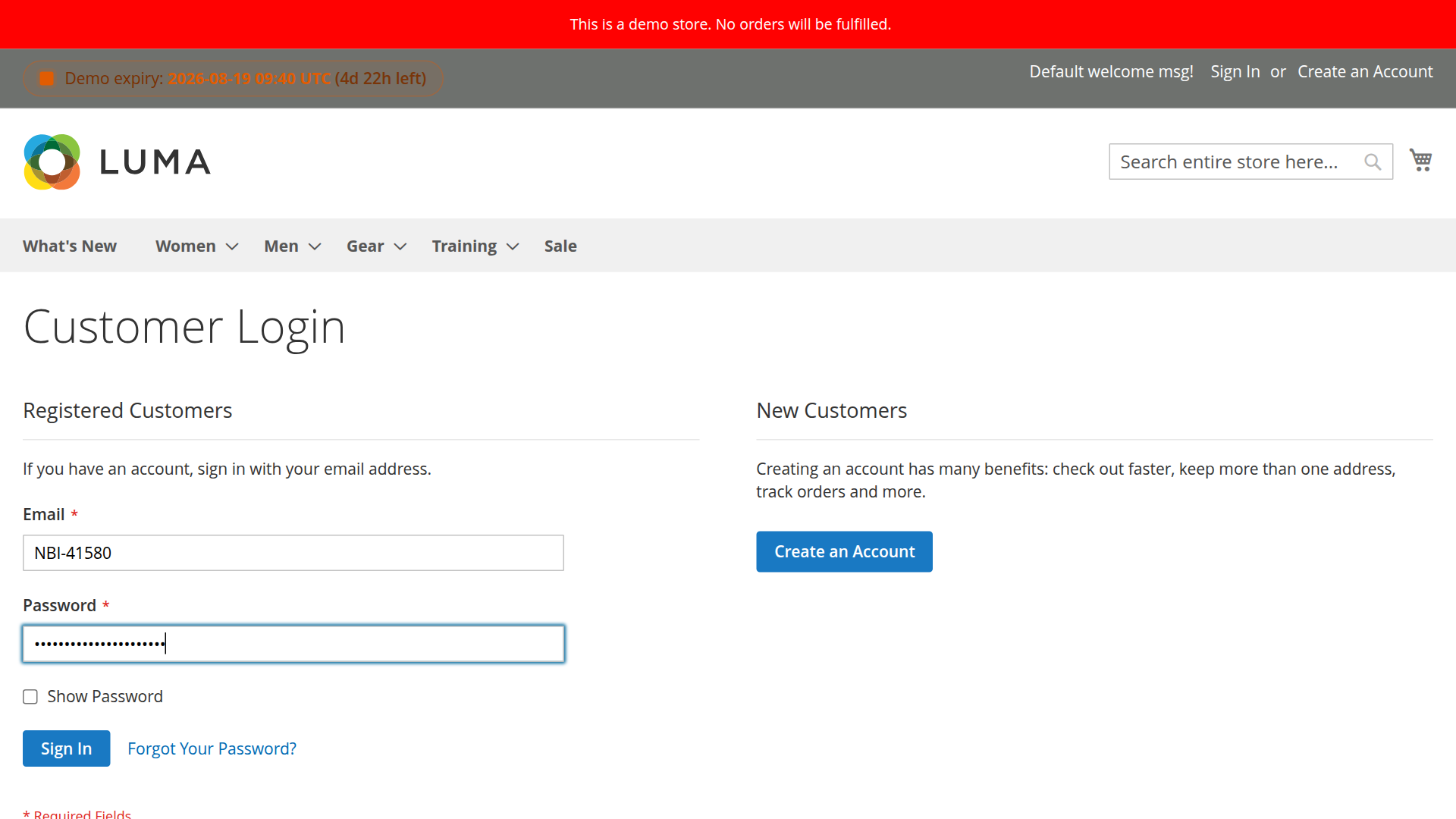
Login Integration
Allow customers to log in using their customer ID instead of email address.
Overview
The login integration feature enables customers to use their customer ID as an alternative to email for authentication. This is particularly useful for B2B scenarios where customers prefer using their assigned customer numbers.
How It Works
Technical Implementation
The extension uses an Observer on the controller_action_predispatch_customer_account_loginPost event:
- Customer enters customer ID in the email field
- Observer (
PreControllerLogin.php) intercepts the login request - System detects if input is a customer ID (numeric check)
- Looks up customer by
customer_id_numberattribute - Replaces customer ID with email address
- Magento's standard authentication proceeds
Code Flow
// Observer/PreControllerLogin.php if (is_numeric($login['username'])) { $customer = $customerRepository->getByCustomerId($login['username']); if ($customer) { $login['username'] = $customer->getEmail(); $request->setPostValue('login', $login); } }Configuration
Enable Login with Customer ID
Navigate to Stores >Configuration > MageB2B > Customer ID > Login Settings
Set Enable Login with Customer ID to Yes
Clear Cache
After enabling, clear cache:
php bin/magento cache:flushCustomer Experience
Login Form
Customers can now use either:
- Email: customer@example.com
- Customer ID: 12345 (or CUST-00123 depending on template)
Login Process
- Go to customer login page
- Enter customer ID in "Email" field
- Enter password
- Click "Sign In"
- System automatically recognizes customer ID and logs in
Template Considerations
Numeric IDs (Recommended for Login)
Templates that work well:
%d- Pure numbers: 1, 2, 3%05d- Zero-padded: 00001, 00002
Why: Easy for customers to remember and type
Alphanumeric IDs
Templates with prefixes:
CUST-%05d- CUST-00001B2B-%06d- B2B-000001
Note: Customers must enter the full ID including prefix
Non-Numeric Templates
Templates that DON'T work for login:
%d-%s- Contains non-numeric suffix- Custom formats with letters
Why: Login detection relies on numeric check
Best Practices
Use simple numeric templates - Easier for customers to remember
Communicate to customers - Inform them they can use customer ID to login
Display customer ID - Show it in account dashboard and emails
Test thoroughly - Verify login works with your template format
Keep email login - Don't disable email login, offer both options
Don't use complex templates - Avoid formats that are hard to type
Don't change templates - Once set, changing affects existing customers
Troubleshooting
Login Not Working
Check configuration:
php bin/magento config:show mageb2b_kundennummer/login/enable_loginShould return 1 (enabled)
Check customer has ID:
SELECT entity_id, email, customer_id_number FROM customer_entity WHERE customer_id_number IS NOT NULL;Check template format:
- Numeric templates work best
- Alphanumeric requires exact match including prefix
Customer ID Not Recognized
Possible causes:
- Customer ID not assigned yet
- Template includes non-numeric characters
- Customer entered ID incorrectly
- Cache not cleared after configuration
Solution:
# Clear cache php bin/magento cache:flush # Verify customer ID exists php bin/magento customer:info customer@example.comMultiple Customers with Same ID
This should never happen if validation is enabled.
Check for duplicates:
SELECT customer_id_number, COUNT(*) as count FROM customer_entity WHERE customer_id_number IS NOT NULL GROUP BY customer_id_number HAVING count >1;Fix duplicates:
- Enable "Validate Uniqueness" in configuration
- Manually reassign duplicate IDs in admin
- Run validation script
Security Considerations
Password Still Required
Customer ID login does NOT bypass password authentication:
- Customer ID only replaces email in lookup
- Password validation remains unchanged
- All security measures still apply
Brute Force Protection
Magento's built-in brute force protection applies:
- Failed login attempts are tracked
- Account lockout after X failed attempts
- CAPTCHA can be enabled
Customer ID Privacy
Consider:
- Customer IDs are less private than emails
- Sequential IDs are predictable
- Use ranges to obscure total customer count
Recommendations:
- Start numbering at higher values (e.g., 10000)
- Use non-sequential ranges
- Don't expose customer IDs publicly
Frontend Display
Show Customer ID in Account
Enable Show Customer ID in Account to display the ID in:
- Customer account dashboard
- Order confirmation emails
- Invoice PDFs
- Account information page
Custom Template Display
Add customer ID to custom templates:
getCustomer()->getCustomAttribute('customer_id_number'); if ($customerId) { echo 'Your Customer ID: ' . $customerId->getValue(); } ?>API Integration
Customer IDs are available via API for external systems:
{ "customer": { "id": 123, "email": "customer@example.com", "extension_attributes": { "customer_id_number": "CUST-00123" } } }See API Integration for details.
Related Features
- Range Management - Configure ID ranges
- Template Formatting - Customize ID formats
- API Integration - Access IDs via API