
Configuration
Open Stores > Configuration > MageB2B > E-Invoice. Choose the store view first: the module reads these values at store scope, so a correct default value can still be overridden by an incomplete store-view value.
Configure one output format and one document flow at a time. Start with manual generation, validate a real sample, and add automation only after the result is accepted.
General Settings
| Setting | Default | Notes |
|---|---|---|
| Enable E-Invoicing | No | Master switch per store view |
| Default B2B Format | ZUGFeRD | Used for invoices and credit memos in this store view |
Choose the format the recipient expects. The setting does not choose a format per customer, and it does not transmit the file.
Invoice Settings
| Setting | Default | Notes |
|---|---|---|
| Generation Mode | Immediate | disabled, immediate, queued, scheduled |
| Generation Trigger | On Invoice Creation | invoice_create, invoice_pay, manual_only |
| Document Type Code | 380 | UN/CEFACT invoice document type |
| Block Invoice on E-Invoice Error | No | Propagates an immediate generation failure, but cannot guarantee rollback after the invoice commit |
| Attach E-Invoice to Invoice Email | No | Attaches XML/PDF to the invoice email |
| Attachment Strategy | auto | auto, xml_only, pdf_only, both |
| Scheduled Batch Size | 100 | Rows per cron run for scheduled mode (1–1000) |
| Recovery Timeout (Minutes) | 30 | Stale queued/processing claims are retried after this (5–1440) |
| Invoice Filename Pattern | invoice-{invoice_increment_id}-{format}.{type} |
See “Filename Variables” |
Credit Memo Settings
Credit memo generation is disabled by default and must be enabled per store view.
| Setting | Default | Notes |
|---|---|---|
| Enable Credit Memo E-Invoicing | No | Required to show actions on credit memo view |
| Generation Mode | Immediate | Same options as invoices |
| Generation Trigger | On Credit Memo Creation | creditmemo_create, manual_only |
| Document Type Code | 381 | UN/CEFACT credit memo type |
| Block Credit Memo on E-Invoice Error | No | Propagates an immediate generation failure; async failures happen after creation |
| Attach E-Invoice to Credit Memo Email | No | Attaches XML/PDF to the credit memo email |
| Attachment Strategy | auto | auto, xml_only, pdf_only, both |
| Scheduled Batch Size | 100 | Rows per cron run for scheduled mode (1–1000) |
| Recovery Timeout (Minutes) | 30 | Stale queued/processing claims are retried after this (5–1440) |
| Credit Memo Filename Pattern | creditmemo-{creditmemo_increment_id}-{format}.{type} |
See “Filename Variables” |
Credit memos use the same Default B2B Format as invoices. The supported formatters cover ZUGFeRD, Factur-X, XRechnung, EN 16931 and PEPPOL BIS for both document types.
Document Storage
| Setting | Default | Notes |
|---|---|---|
| Storage Strategy | Permanent Storage | permanent or on_demand |
| File Storage Path | einvoice |
Relative to Magento's private var/ directory |
Storage locations (default settings):
- Invoices:
var/einvoice/ - Credit memos:
var/einvoice/creditmemo/
Files are stored below Magento's private var/ directory, not in public pub/media. They are served to customers and admins through controlled download actions, never through a public URL. To move artifacts written by older module versions from pub/media, use php bin/magento einvoice:storage:migrate-public (see CLI).
Filename Variables
Use these variables in filename patterns:
| Variable | Invoice | Credit Memo |
|---|---|---|
{invoice_increment_id} |
✓ | Alias of credit-memo increment ID |
{creditmemo_increment_id} |
- | ✓ |
{invoice_id} |
Invoice entity ID | Alias of credit-memo entity ID |
{creditmemo_id} |
- | Credit-memo entity ID |
{format} |
✓ | ✓ |
{type} |
✓ (xml/pdf) |
✓ (xml/pdf) |
{date} |
✓ (YYYY-MM-DD) |
✓ (YYYY-MM-DD) |
{datetime} |
✓ (YYYY-MM-DD_HH-mm-ss) |
✓ (YYYY-MM-DD_HH-mm-ss) |
The admin hint lists {order_increment_id}, but the file managers do not replace that token. Do not use it in a production filename pattern.
Company Information
These values are used for all formats (invoices and credit memos):
| Field | Notes |
|---|---|
| VAT ID | Required |
| Tax Number | Required for German formats |
| Company Registration Number | HRB/HRA |
| SIRET Number | Required for Factur-X (France) |
| Bank IBAN / Bank BIC/SWIFT | Used in payment instructions |
| Default Payment Terms (Days) | Optional |
| Seller Contact (Name/Phone/Email) | Required for XRechnung (BR-DE-2) |
| Seller Trading Name (BT-28) | Optional alternative business name |
| Seller GLN | Global Location Number (ISO 6523 scheme 0088) |
| Seller DUNS Number | Dun & Bradstreet identifier (scheme 0060) |
| Seller Leitweg-ID | Only when the seller itself is a public entity (scheme 0204) |
See Seller Identity for details.
Tax Representative
Non-EU sellers with EU VAT obligations can declare a fiscal representative (BG-11 / BT-63). Off by default.
| Setting | Notes |
|---|---|
| Enable Tax Representative | Master switch |
| Representative Name | Legal entity name |
| Representative VAT ID | Mandatory when enabled |
| Street / Postcode / City / Country | Representative's address |
VAT Classification
Controls the EN16931 BT-151 category (S / Z / E / AE / K / G / O) emitted per invoice line.
| Setting | Default | Notes |
|---|---|---|
| Kleinunternehmer (§19 UStG) | No | When enabled, every line is classified as E regardless of tax |
| Default Category for 0% Lines | Z | Used when a 0% line does not match intra-community (K) or export (G) rules |
| Treat Magento Giftcards as Multi-Purpose Voucher | Yes | Adobe Commerce giftcard products → O |
| Voucher Override Product Attribute | (empty) | Product attribute code whose value multi_purpose / single_purpose overrides detection |
| Exemption Reason: Intra-Community (K) | Innergemeinschaftliche Lieferung (§4 Nr. 1b UStG) | Override text for BT-120 |
| Exemption Reason: Export (G) | Ausfuhrlieferung (§4 Nr. 1a UStG) | Override text for BT-120 |
| Exemption Reason: Exempt (E) | Kleinunternehmer (§19 UStG) | Override text for BT-120 |
| Exemption Reason: Reverse Charge (AE) | Steuerschuldnerschaft des Leistungsempfängers (§13b UStG) | Override text for BT-120 |
| Exemption Reason: Out of Scope (O) | Mehrzweck-Gutschein (§3 Abs. 15 UStG) | Override text for BT-120 |
See VAT Classification for the full decision tree.
The intra-community / export rules rely on Magento's built-in EU country list under Stores > Configuration > General > Countries Options.
Payment Terms Mapping
Use this section to map payment-method-specific terms and payment means codes.
| Setting | Notes |
|---|---|
| Default Payment Terms Template | Supports {due_days}, {due_date}, {invoice_date}, {payment_method} |
| Default Payment Means Code | Example: 58 (SEPA transfer), 59 (SEPA direct debit) |
| Default Payment Means Code (No IBAN) | Fallback when no IBAN is configured (example: 1) |
| Payment Method Mapping | Override terms and means code per payment method |
Accounting
Use this section to provide line-level accounting references (BT-133).
| Setting | Notes |
|---|---|
| Accounting Source Type | none, order_item_field, product_attribute, customer_attribute |
| Order Item Field | Selectable when source type is order_item_field |
| Product Attribute | Selectable when source type is product_attribute |
| Customer Attribute | Selectable when source type is customer_attribute |
Document References
Map order data to the buyer/seller reference fields (BT-11, BT-13, BT-14, BT-46, BT-47) that recipients use for internal routing.
| Setting | Default | Notes |
|---|---|---|
| Project Reference (BT-11) | (empty) | Optional project reference |
| Purchase Order Reference (BT-13) | payment:po_number |
Buyer's PO number |
| Sales Order Reference (BT-14) | order:increment_id |
Your order number |
| Buyer Identifier (BT-46) + Scheme | (empty) | Buyer reference and its scheme |
| Buyer Legal Registration Identifier (BT-47) + Scheme | (empty) | Buyer's legal registration ID |
| Include Order Customer Note (BT-22) | No | Adds the order's customer note to the document |
Prepayments and Redeemed Credit
| Setting | Notes |
|---|---|
| Invoice Prepaid Amount Field (BT-113) | Which document field carries the already-paid amount |
| Credit Memo Prepaid Amount Field (BT-113) | Same for credit memos |
Invoice Items
| Setting | Default | Notes |
|---|---|---|
| Include Configurable Product Options (BT-154) | Yes | Adds the chosen options to the line |
| Use Selected Simple Product Name (BT-153) | No | Uses the child product's name instead of the configurable's |
| Default Item Unit Code | H87 | UN/ECE unit code (H87 = pieces) used when no product unit is set |
Native Checkout Buyer Reference
Lets the buyer enter a Buyer Reference / Leitweg-ID during checkout, stored on the order and written into the e-invoice.
| Setting | Default | Notes |
|---|---|---|
| Buyer Reference / Leitweg-ID | Disabled | Enables the checkout field |
| Checkout Field Label | Buyer Reference / Leitweg-ID | Visible label |
| Checkout Help Text | (short explanation) | Shown below the field |
| Maximum Length | 50 | Input limit |
Delivery and Service Date
| Setting | Default | Notes |
|---|---|---|
| Delivery / Service Date Source | invoice_date |
Which date is emitted as the delivery/service date |
Customer Account Downloads
Controls which generated documents the customer can download in their account area. All five are enabled by default.
| Setting | Default | Notes |
|---|---|---|
| Invoice XML | Yes | XML download on the invoice page |
| Invoice PDF | Yes | PDF download (hybrid documents) |
| Invoice XML ZIP | Yes | Multi-document ZIP download |
| Credit Memo XML | Yes | XML download on the credit-memo page |
| Credit Memo PDF | Yes | PDF download for credit memos |
Validation & Error Handling
| Setting | Default | Notes |
|---|---|---|
| Validation Level | Standard | minimal, standard, strict |
| Strict XSD Validation | No | Enables strict schema validation |
| Enable Error Notifications | No | Sends emails on failures |
| Error Notification Email | (empty) | Required when notifications are enabled |
| Error Notification Threshold | 3 | Consecutive failures before sending |
There is no automatic retry of error documents: the cron worker only recovers stale queued/processing claims (see Recovery Timeout). Retrying a failed document is a deliberate manual action — the detail-page Generate E-Invoice button applies force automatically for error rows.
REST API Settings
| Setting | Default | Notes |
|---|---|---|
| Include E-Invoice in Invoice API | No | Adds einvoice_xml and einvoice_pdf to GET /V1/invoices/{id} |
| Include E-Invoice in Credit Memo API | No | Adds einvoice_xml and einvoice_pdf to GET /V1/creditmemos/{id} |
See: REST API
ZUGFeRD / Factur-X Configuration
| Setting | Notes |
|---|---|
| ZUGFeRD Profile | Applies to invoices and credit memos |
PEPPOL BIS Billing 3.0
Settings for UBL-based PEPPOL delivery. Applied when Default B2B Format is PEPPOL BIS.
| Setting | Notes |
|---|---|
| Seller Endpoint Scheme (EAS) | 70+ PEPPOL codes (9930 DE VAT, 0088 GLN, 9914 AT VAT, 0204 Leitweg-ID, …) |
| Seller Endpoint ID | Identifier matching the selected scheme |
| CustomizationID override | Leave empty for PEPPOL BIS Billing 3.0 default |
| ProfileID override | Leave empty for billing:01:1.0 default |
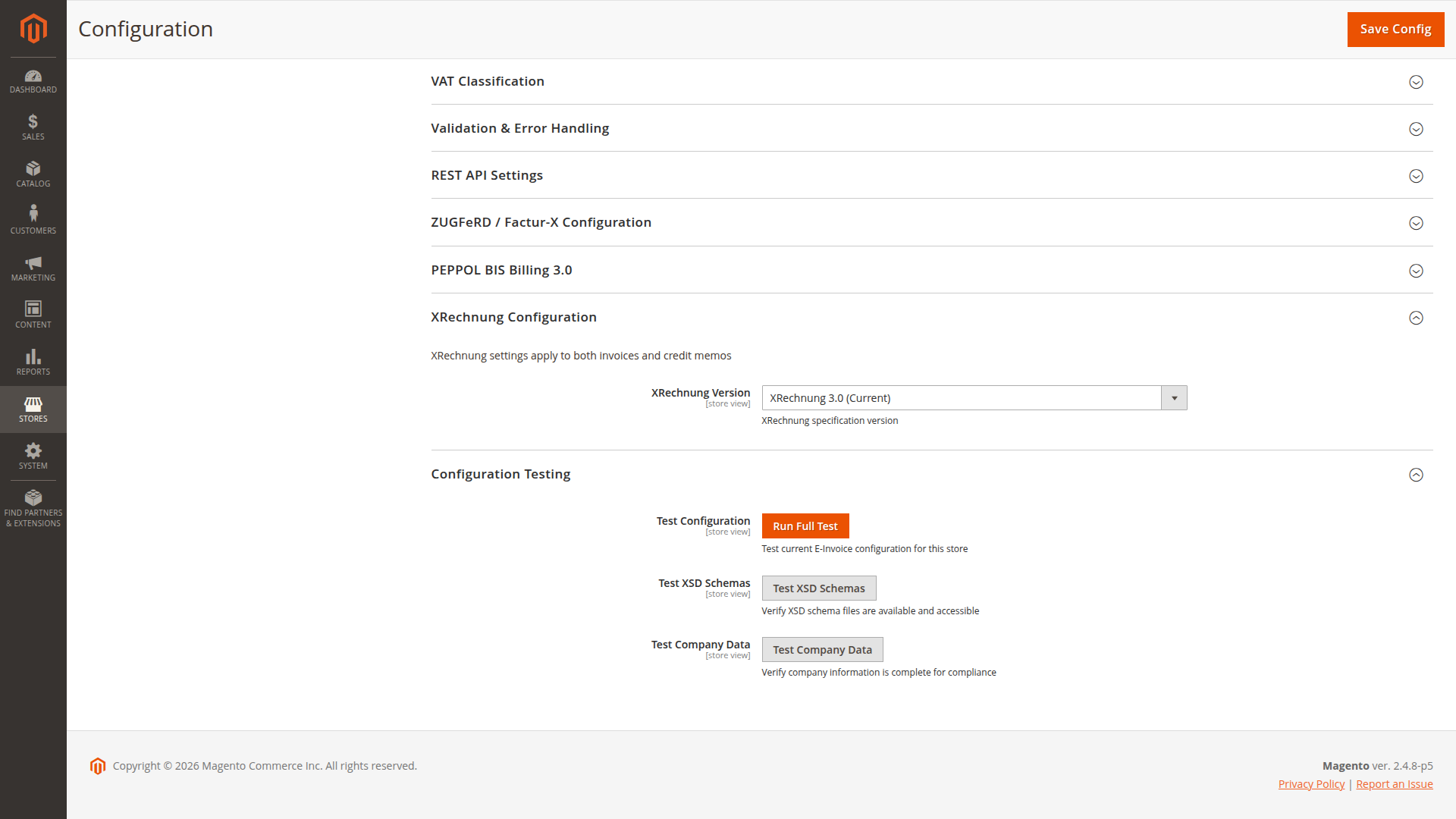
XRechnung Configuration
| Setting | Default | Notes |
|---|---|---|
| XRechnung Version | 3.0 | 2.2, 2.3, 3.0 |
Configuration Testing
Use the built-in buttons:
- Test Configuration
- Test XSD Schemas
- Test Company Data
These checks are local diagnostics. They do not replace recipient testing, PEPPOL business-rule validation or government-portal validation.
Current behavior to plan for
- Block Invoice on E-Invoice Error runs after Magento commits the invoice. It can surface an immediate error but cannot guarantee that no Magento invoice exists.
- Factur-X invoice activation follows Default B2B Format. Select Factur-X there and save the same store view; no hidden enabled-formats setting is required.
See Generation Modes and Triggers for the operational impact.
System Configuration Reference
Generated from the module etc/adminhtml/system.xml files so the KB matches the Magento admin configuration structure.
e-invoice
E-Invoice / General Settings (einvoice/general/*)
| Config path | Admin label | Type |
|---|---|---|
einvoice/general/enabled |
Enable E-Invoicing | select |
einvoice/general/default_format |
Default B2B Format | select |
E-Invoice / Invoice Settings (einvoice/invoice_settings/*)
| Config path | Admin label | Type |
|---|---|---|
einvoice/invoice_settings/generation_mode |
Generation Mode | select |
einvoice/invoice_settings/generation_trigger |
Generation Trigger | select |
einvoice/invoice_settings/document_type |
Document Type Code | select |
einvoice/invoice_settings/block_on_error |
Block Invoice on E-Invoice Error | select |
einvoice/invoice_settings/attach_to_email |
Attach E-Invoice to Invoice Email | select |
einvoice/invoice_settings/attachment_strategy |
Attachment Strategy | select |
einvoice/invoice_settings/scheduled_batch_size |
Scheduled Batch Size | text |
einvoice/invoice_settings/recovery_timeout_minutes |
Recovery Timeout (Minutes) | text |
einvoice/invoice_settings/filename_pattern |
Invoice Filename Pattern | text |
E-Invoice / Payment Terms Mapping (einvoice/payment_terms/*)
| Config path | Admin label | Type |
|---|---|---|
einvoice/payment_terms/default_terms_template |
Default Payment Terms Template | textarea |
einvoice/payment_terms/default_payment_means_code |
Default Payment Means Code | text |
einvoice/payment_terms/default_payment_means_code_no_iban |
Default Payment Means Code (No IBAN) | text |
einvoice/payment_terms/mapping |
Payment Method Mapping | custom |
E-Invoice / Accounting (einvoice/accounting/*)
| Config path | Admin label | Type |
|---|---|---|
einvoice/accounting/source_type |
Accounting Source Type | select |
einvoice/accounting/order_item_field |
Order Item Field | select |
einvoice/accounting/product_attribute |
Product Attribute | select |
einvoice/accounting/customer_attribute |
Customer Attribute | select |
E-Invoice / Credit Memo Settings (einvoice/creditmemo_settings/*)
| Config path | Admin label | Type |
|---|---|---|
einvoice/creditmemo_settings/enabled |
Enable E-Invoice for Credit Memos | select |
einvoice/creditmemo_settings/generation_mode |
Generation Mode | select |
einvoice/creditmemo_settings/generation_trigger |
Generation Trigger | select |
einvoice/creditmemo_settings/document_type |
Document Type Code | select |
einvoice/creditmemo_settings/block_on_error |
Block Credit Memo on E-Invoice Error | select |
einvoice/creditmemo_settings/attach_to_email |
Attach E-Invoice to Credit Memo Email | select |
einvoice/creditmemo_settings/attachment_strategy |
Attachment Strategy | select |
einvoice/creditmemo_settings/scheduled_batch_size |
Scheduled Batch Size | text |
einvoice/creditmemo_settings/recovery_timeout_minutes |
Recovery Timeout (Minutes) | text |
einvoice/creditmemo_settings/filename_pattern |
Credit Memo Filename Pattern | text |
E-Invoice / Document Storage (einvoice/storage/*)
| Config path | Admin label | Type |
|---|---|---|
einvoice/storage/storage_strategy |
Storage Strategy | select |
einvoice/storage/file_storage_path |
File Storage Path | text |
E-Invoice / Company Information (einvoice/company/*)
| Config path | Admin label | Type |
|---|---|---|
einvoice/company/vat_id |
VAT ID | text |
einvoice/company/tax_number |
Tax Number | text |
einvoice/company/registration_number |
Company Registration Number | text |
einvoice/company/registration_scheme |
Company Registration Scheme | select |
einvoice/company/siret_number |
SIRET Number | text |
einvoice/company/bank_iban |
Bank IBAN | text |
einvoice/company/bank_bic |
Bank BIC/SWIFT | text |
einvoice/company/payment_terms_days |
Default Payment Terms (Days) | text |
einvoice/company/seller_contact_name |
Seller Contact Name | text |
einvoice/company/seller_contact_department |
Seller Contact Department | text |
einvoice/company/seller_contact_phone |
Seller Contact Phone | text |
einvoice/company/seller_contact_email |
Seller Contact Email | text |
einvoice/company/seller_trading_name |
Seller Trading Name | text |
einvoice/company/seller_gln |
Seller GLN | text |
einvoice/company/seller_duns |
Seller DUNS Number | text |
einvoice/company/seller_leitweg_id |
Seller Leitweg-ID | text |
E-Invoice / Tax Representative (einvoice/tax_representative/*)
| Config path | Admin label | Type |
|---|---|---|
einvoice/tax_representative/enabled |
Enable Tax Representative | select |
einvoice/tax_representative/name |
Representative Name | text |
einvoice/tax_representative/vat_id |
Representative VAT ID | text |
einvoice/tax_representative/street |
Street | text |
einvoice/tax_representative/postcode |
Postcode | text |
einvoice/tax_representative/city |
City | text |
einvoice/tax_representative/country |
Country | select |
E-Invoice / VAT Classification (einvoice/vat/*)
| Config path | Admin label | Type |
|---|---|---|
einvoice/vat/kleinunternehmer |
Kleinunternehmer (§19 UStG) | select |
einvoice/vat/default_zero_rate_category |
Default Category for 0% Lines | select |
einvoice/vat/giftcard_multi_purpose |
Treat Magento Giftcards as Multi-Purpose Voucher | select |
einvoice/vat/voucher_product_attribute |
Voucher Override Product Attribute | text |
einvoice/vat/exemption_reason_k |
Exemption Reason: Intra-Community (K) | text |
einvoice/vat/exemption_reason_g |
Exemption Reason: Export (G) | text |
einvoice/vat/exemption_reason_e |
Exemption Reason: Exempt (E) | text |
einvoice/vat/exemption_reason_ae |
Exemption Reason: Reverse Charge (AE) | text |
einvoice/vat/exemption_reason_o |
Exemption Reason: Out of Scope (O) | text |
E-Invoice / Document References (einvoice/references/*)
| Config path | Admin label | Type |
|---|---|---|
einvoice/references/project_reference |
Project Reference (BT-11) | select |
einvoice/references/buyer_order_reference |
Purchase Order Reference (BT-13) | select |
einvoice/references/seller_order_reference |
Sales Order Reference (BT-14) | select |
einvoice/references/buyer_identifier |
Buyer Identifier (BT-46) | select |
einvoice/references/buyer_identifier_scheme |
Buyer Identifier Scheme | select |
einvoice/references/buyer_legal_registration_identifier |
Buyer Legal Registration Identifier (BT-47) | select |
einvoice/references/buyer_legal_registration_identifier_scheme |
Buyer Legal Registration Scheme | select |
einvoice/references/include_order_customer_note |
Include Order Customer Note (BT-22) | select |
E-Invoice / Prepayments and Redeemed Credit (einvoice/prepayment/*)
| Config path | Admin label | Type |
|---|---|---|
einvoice/prepayment/invoice_amount_field |
Invoice Prepaid Amount Field (BT-113) | select |
einvoice/prepayment/creditmemo_amount_field |
Credit Memo Prepaid Amount Field (BT-113) | select |
E-Invoice / Invoice Items (einvoice/item/*)
| Config path | Admin label | Type |
|---|---|---|
einvoice/item/include_configurable_options |
Include Configurable Product Options (BT-154) | select |
einvoice/item/use_simple_product_name |
Use Selected Simple Product Name (BT-153) | select |
einvoice/item/default_unit_code |
Default Item Unit Code | select |
E-Invoice / Native Checkout Buyer Reference (einvoice/checkout/*)
| Config path | Admin label | Type |
|---|---|---|
einvoice/checkout/buyer_reference_mode |
Buyer Reference / Leitweg-ID | select |
einvoice/checkout/buyer_reference_label |
Checkout Field Label | text |
einvoice/checkout/buyer_reference_help |
Checkout Help Text | text |
einvoice/checkout/buyer_reference_max_length |
Maximum Length | text |
E-Invoice / Delivery and Service Date (einvoice/delivery/*)
| Config path | Admin label | Type |
|---|---|---|
einvoice/delivery/source |
Delivery / Service Date Source | select |
E-Invoice / Customer Account Downloads (einvoice/customer_download/*)
| Config path | Admin label | Type |
|---|---|---|
einvoice/customer_download/invoice_xml |
Invoice XML | select |
einvoice/customer_download/invoice_pdf |
Invoice PDF | select |
einvoice/customer_download/invoice_zip |
Invoice XML ZIP | select |
einvoice/customer_download/creditmemo_xml |
Credit Memo XML | select |
einvoice/customer_download/creditmemo_pdf |
Credit Memo PDF | select |
E-Invoice / Validation & Error Handling (einvoice/validation/*)
| Config path | Admin label | Type |
|---|---|---|
einvoice/validation/validation_level |
Validation Level | select |
einvoice/validation/strict_xsd_validation |
Strict XSD Validation | select |
einvoice/validation/error_notification_enabled |
Enable Error Notifications | select |
einvoice/validation/error_notification_email |
Error Notification Email | text |
einvoice/validation/error_notification_threshold |
Error Notification Threshold | text |
E-Invoice / REST API Settings (einvoice/api/*)
| Config path | Admin label | Type |
|---|---|---|
einvoice/api/invoice_enabled |
Include E-Invoice in Invoice API | select |
einvoice/api/creditmemo_enabled |
Include E-Invoice in Credit Memo API | select |
E-Invoice / ZUGFeRD / Factur-X Configuration (einvoice/zugferd_config/*)
| Config path | Admin label | Type |
|---|---|---|
einvoice/zugferd_config/profile |
ZUGFeRD / Factur-X Profile | select |
E-Invoice / PEPPOL BIS Billing 3.0 (einvoice/peppol_bis/*)
| Config path | Admin label | Type |
|---|---|---|
einvoice/peppol_bis/seller_endpoint_scheme |
Seller Endpoint Scheme (EAS) | select |
einvoice/peppol_bis/seller_endpoint_id |
Seller Endpoint ID | text |
einvoice/peppol_bis/customization_id |
CustomizationID override | text |
einvoice/peppol_bis/profile_id |
ProfileID override | text |
E-Invoice / XRechnung Configuration (einvoice/xrechnung_config/*)
| Config path | Admin label | Type |
|---|---|---|
einvoice/xrechnung_config/version |
XRechnung Version | select |
E-Invoice / Configuration Testing (einvoice/testing/*)
| Config path | Admin label | Type |
|---|---|---|
einvoice/testing/test_configuration |
Test Configuration | button |
einvoice/testing/test_schemas |
Test XSD Schemas | button |
einvoice/testing/test_company_data |
Test Company Data | button |