
Configuration
Open Punchout > Configuration and choose the correct website or store view before saving. Store-specific settings are important when buyers use different catalogs, currencies or security policies.
General
| Setting | Default | What it changes |
|---|---|---|
| Enable Punchout | Yes | Enables setup, cart, transfer, session and document processing for the selected scope. |
| Punchout return action label | Return to System | Replaces the checkout action during an active PunchOut storefront session. |
| Enable Sandbox Callback Mode | No | Exposes /punchout/sandbox/callback so a test return payload can be inspected. Never leave this on in production. |
Security
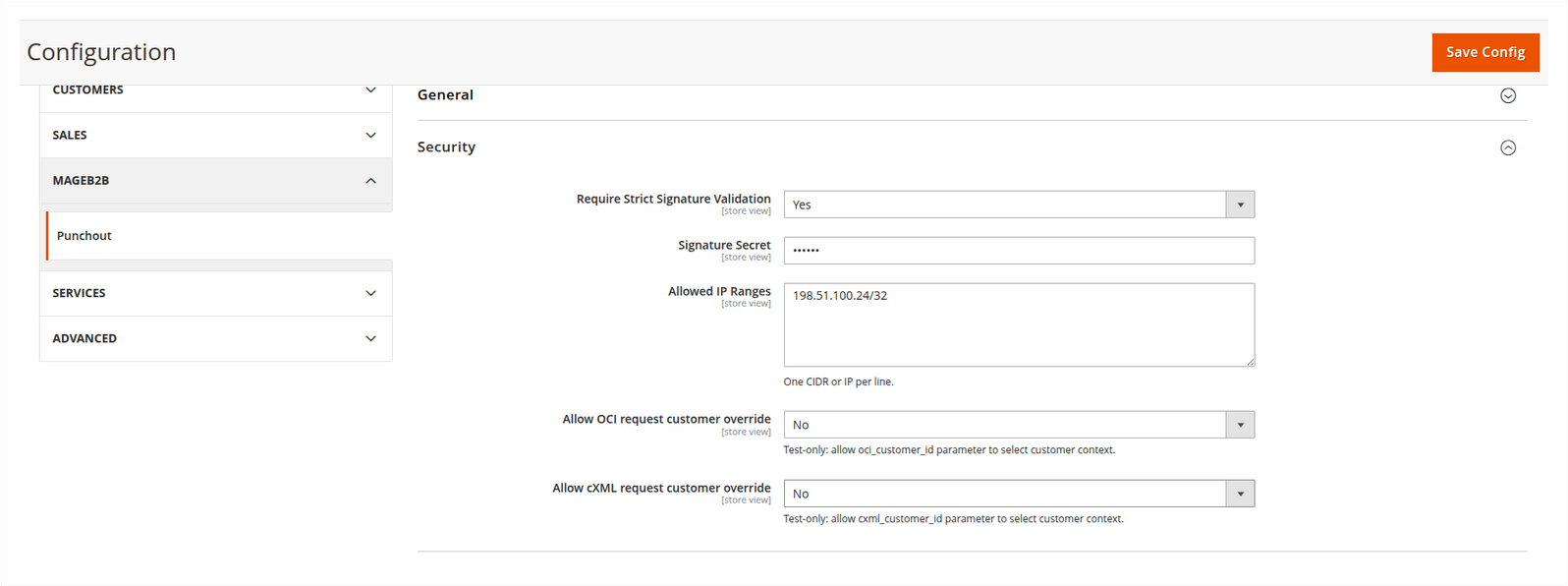
Strict signature validation
Strict mode verifies an HMAC-SHA256 signature made with the configured signature secret. The caller sends the 64-character digest in X-Punchout-Signature or the signature parameter. A sha256= prefix is accepted.
This signature is a SoftwareSilo security layer, not a value that every OCI or cXML platform sends automatically. Enable it only after the procurement integration has implemented and verified the same signing rule. For a raw request body, sign that body. For parameter requests, the module removes the signature field, sorts associative keys and signs the normalized JSON representation.
Allowed IP ranges
Enter one IPv4/IPv6 address or CIDR range per line. An empty field permits requests from every source IP. In production, use the procurement provider's current outbound ranges and confirm that Magento sees the real client IP through your proxy or load balancer.
Request customer overrides
Allow OCI request customer override and Allow cXML request customer override allow request parameters to select a Magento customer. Both are disabled by default and labelled test-only. Keep them off in production; assign the customer on the buyer profile instead.
Outbound TLS
TLS certificate verification is enabled by default. Allow insecure outbound TLS in sandbox mode can disable certificate checks only while sandbox mode is active. It is intended for isolated test systems, not production.
Customer identity and JIT provisioning
The Store-view Customer Identity settings control whether customer-by-e-mail resolution can create an account when no Magento customer exists. Select the customer group used for those accounts before enabling JIT provisioning.
Each Buyer Profile selects one explicit resolution mode:
- Guest creates no Magento customer session;
- Fixed Magento Customer uses the selected customer;
- Customer E-mail resolves the e-mail extracted from the configured OCI or cXML source and can use JIT provisioning;
- Optional Request Customer ID uses a permitted request ID when present;
- Required Request Customer ID rejects a request without that ID.
Magento's configured account-sharing and account-confirmation policies remain authoritative. When confirmation is required, Magento sends its normal confirmation message and PunchOut cannot continue as that new account until it is confirmed.
Cart pricing
Allow inbound cart item prices is disabled by default. With that setting off, a price supplied to /punchout/cart/add is ignored and Magento calculates the product price. Enable buyer-supplied prices only when the integration contract requires them and the caller is trusted to set them.
cXML Profile Discovery
Profile Discovery is enabled by default for cXML 1.1 and 1.2 buyers. Magento builds the response from the Store View and Buyer Profile instead of a separate transaction list.
Leave Public PunchOut Base URL empty when the Store View base URL is publicly correct. Set it only when a reverse proxy or external gateway exposes Magento under a different scheme or host. The value must not contain a query string or fragment.
The Buyer Profile's Accept PunchOutSetupRequest and Accept OrderRequest switches decide which transactions are advertised and accepted. See cXML Profile Discovery.
Inbound Orders
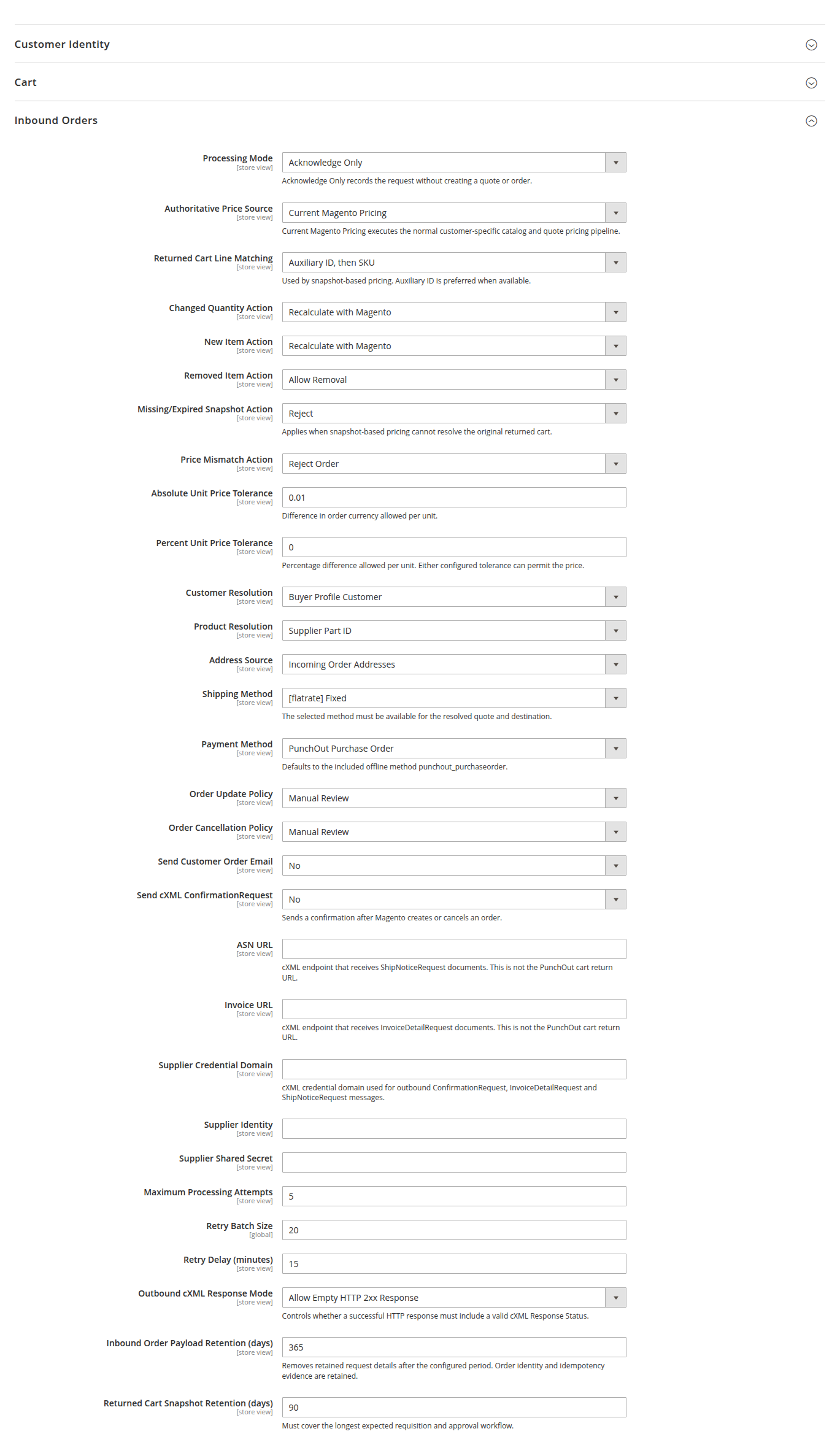
These Store-view settings control an approved cXML OrderRequest. They do not affect the earlier cart-return step.
Processing and pricing
- Processing Mode chooses Acknowledge Only, Validate Only or Create Magento Order.
- Authoritative Price Source chooses current Magento pricing, the returned-cart snapshot, incoming prices or the hybrid original-if-unchanged policy.
- Returned Cart Line Matching uses auxiliary ID then SKU, or SKU only.
- Changed Quantity, New Item, Removed Item and Missing Snapshot settings decide whether Magento recalculates, allows, rejects or sends a request to manual review.
- Price Mismatch Action works with the absolute and percentage unit-price tolerances.
For most approval workflows, start with Original Price if Unchanged; Otherwise Current Magento Price. It keeps the price Magento returned for an unchanged line and sends changed quantities or new products through current customer-specific pricing.
Magento order context
Choose how Magento resolves the customer, product and addresses. Then select a shipping method and payment method available to the resulting quote. The included PunchOut Purchase Order method is intended for approved procurement orders.
Update and cancellation policies can reject a request, send it to manual review or perform their supported automatic action. Send Customer Order Email controls Magento's normal new-order email independently from cXML confirmation delivery.
Confirmation, document routing, retries and retention
Enable ConfirmationRequest only after the buyer has supplied a reachable HTTPS
endpoint and supplier credentials are complete. Configure the ASN and Invoice URLs
separately; neither document is sent to the browser cart-return URL. Buyer Profile
URLs override the Store-view defaults. Retry settings control inbound processing
attempts. Keep the returned-cart snapshot longer than the longest expected
requisition and approval cycle.
Buyer-profile overrides take precedence over these Store-view values. Leave an override empty to inherit the selected Store view. See Inbound Orders and Pricing for the decision flow.
Trace and session
- Enable Trace Logging defaults to Yes. Payloads are sanitized before storage, but trace access should still be limited to integration and support administrators.
- Trace Retention defaults to 30 days. The daily cleanup job removes older traces.
- Token Expiration defaults to 2 hours and accepts decimal values such as
0.5. Choose a duration long enough for the buyer's shopping flow. An invalid or non-positive value prevents context creation.
Analytics
Enable PunchOut Analytics controls the daily aggregates shown under Punchout > Analytics. The setting is enabled by default and follows Magento scope inheritance. The aggregates are independent of trace retention, so clearing old traces does not remove the reporting history.
Document Queue
The queue is enabled by default. Magento adds shipments and invoices belonging to PunchOut-created orders and delivers them to the effective Buyer Profile or Store-view ASN and Invoice URLs. Encrypted routing and payload data are retained with the order and queue row, so delivery does not depend on the expired browser session.
| Setting | Default | Effect |
|---|---|---|
| Enable Queue Processing | Yes | Allows the five-minute cron job to process due documents. |
| Batch Size per Cron Run | 20 | Maximum due rows processed per store in one run. |
| Maximum Retry Attempts | 5 | Attempts recorded on a newly queued document. |
| Retry Delay | 15 minutes | Delay before a failed row becomes eligible again. |
| Completed Queue Retention | 365 days | Removes completed and failed operational queue rows after the selected period. |
Definite HTTP failures follow the retry policy. A transport interruption after the request may have reached the receiver becomes Delivery Unknown and is not retried automatically. Verify the procurement system first, then use the separately protected Retry Unknown Delivery action only when another delivery is safe.
Retention and debug logging
Request replay retention is configurable and preserves completed results for safe idempotent retries. Inbound payload, returned-cart snapshot, trace and completed queue retention are configured independently. The cleanup batch size is a Default Config setting used by the daily retention job.
Store-scoped debug logging writes additional non-secret diagnostics to
var/log/punchout.log. Enable it only during a controlled investigation and disable
it afterward.
Frontend operation policy
The policy is enabled by default and applies different route lists to create,
edit, inspect, OCI DETAIL and OCI DETAILADD sessions. The supplied defaults
allow normal catalogue and cart editing for create and edit. Inspect reconstructs
the supplied cart as read-only. DETAIL opens only the selected product, while
DETAILADD allows that product's Add to Cart action and immediately returns the one
selected line. Read Storefront Operation Policy
before changing these lists; an incorrect full-action name can block a valid buyer
journey.
For the literal configuration paths and field types, use Admin Field Reference.