
Ordered Products for Magento 2
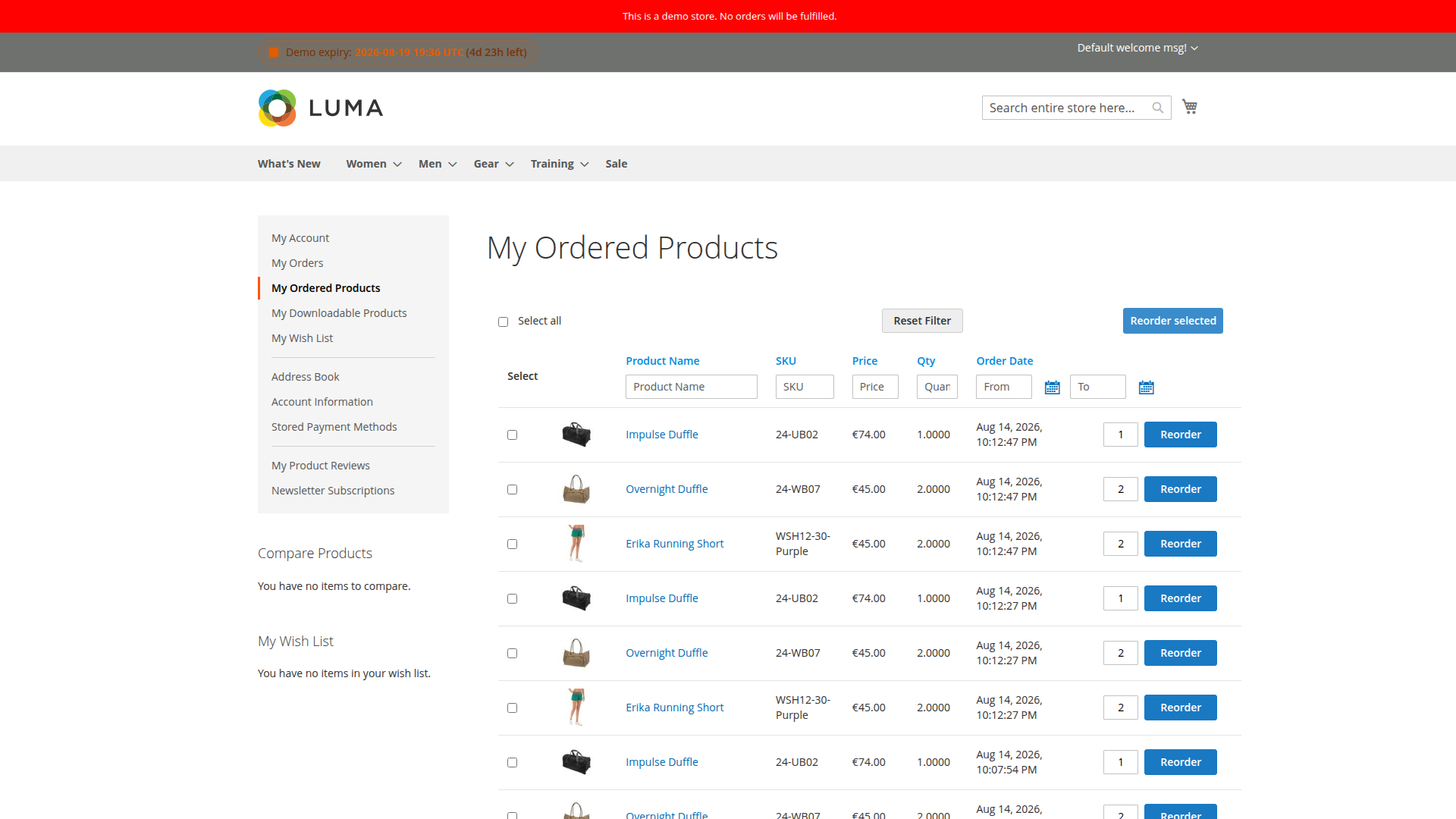
SoftwareSilo Ordered Products gives signed-in customers a searchable list of products from their own order history. They can adjust a quantity, add one item to the current cart or select several visible rows for a bulk reorder.
The page uses historical order-item data for the product name, SKU, ordered quantity, price and order date. Adding an item to the cart is a new cart operation, so current catalog availability, product options, stock, pricing and cart rules still apply.
What customers can do
- Filter by product name, SKU, historical price, exact ordered quantity and order date.
- Sort by name, SKU, price, quantity or date.
- Show every historical order row or only the latest row for each product.
- Reuse saved configurable selections when those options are still valid.
- Add one item or several selected rows to the active cart.
The list is available under My Account > My Ordered Products when the feature and account link are enabled.
Start here
- Install Ordered Products
- Configure history, prices and pagination
- Understand which order items appear
- Use filters, sorting and pagination
- Reorder one or several products
- Troubleshoot the customer account page
- FAQ
Configuration is under Stores > Configuration > MageB2B > Ordered Products.