
Configure Ordered Products
Open Stores > Configuration > MageB2B > Ordered Products. All settings use Magento configuration scope, so check the selected website or store view before saving.
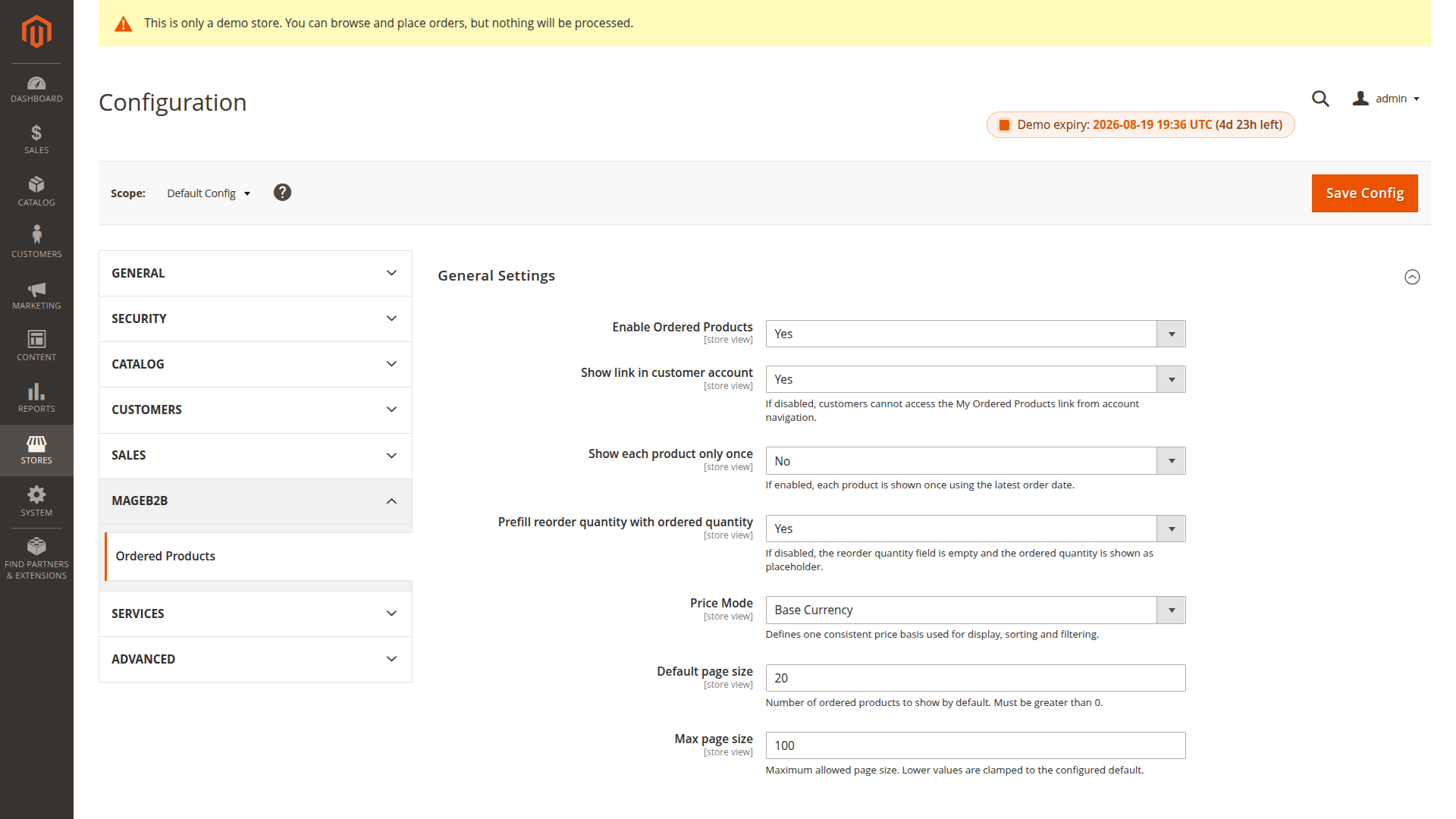
Availability and account navigation
Enable Ordered Products controls the page and reorder endpoint. When disabled, the account page redirects to the customer dashboard and reorder requests are rejected.
Show link in customer account controls the My Ordered Products navigation entry. Disabling it hides the link but does not block the direct page URL while the extension remains enabled.
History rows
Show each product only once chooses between two views:
- No shows every top-level order item from the customer's history.
- Yes keeps the latest order item for each Magento product ID and labels the date column Last Ordered.
For a configurable product, the retained row carries the saved options from that order. A newer purchase with a different variant selection replaces the older row when this setting is enabled.
Prefill reorder quantity with ordered quantity places the historical quantity in the reorder field. When disabled, the field is empty and shows the historical quantity as its placeholder. If the customer leaves it empty, the reorder still uses that historical quantity.
Historical price display
Price Mode controls the price field used for display, filtering and sorting:
- Base Currency uses the order item's base price and the order's base currency code.
- Order Currency uses the price and currency recorded on the original order.
Order Currency mode can display rows in different currencies when the customer ordered through different currency contexts. Sorting and filtering compare the stored numeric amounts without currency conversion. Use Base Currency when buyers need one consistent comparison basis.
The displayed value is historical. Magento calculates the current price when the item is added to the cart.
Pagination limits
Default page size sets the number of rows requested by the account page. Invalid or non-positive values fall back to 20.
Max page size caps a requested page size. It can never be lower than the configured default. Invalid or non-positive values fall back to 100.
System configuration reference
Ordered Products / General Settings (orderedproducts/general/*)
| Config path | Admin label | Type |
|---|---|---|
orderedproducts/general/enabled |
Enable Ordered Products | select |
orderedproducts/general/show_link_in_account |
Show link in customer account | select |
orderedproducts/general/show_each_product_once |
Show each product only once | select |
orderedproducts/general/prefill_ordered_qty |
Prefill reorder quantity with ordered quantity | select |
orderedproducts/general/price_mode |
Price Mode | select |
orderedproducts/general/default_page_size |
Default page size | text |
orderedproducts/general/max_page_size |
Max page size | text |