
Configure Order Cancellation
Open Stores > Configuration > MageB2B > Order Cancellation. The settings support Magento configuration scopes, so a website or store view can inherit the default values or use its own cancellation policy.
General settings
Define the comment which should be set when order is cancelled through this extension adds a comment to the order history after the cancellation attempt has completed. Keep it useful to support and fulfillment staff, for example Cancelled through the customer account.
Display on frontend controls whether that history comment is visible in the customer's order view.
Customer notified marks the history entry as customer-notified. It does not switch the dedicated cancellation email on or off. Email delivery has its own setting.
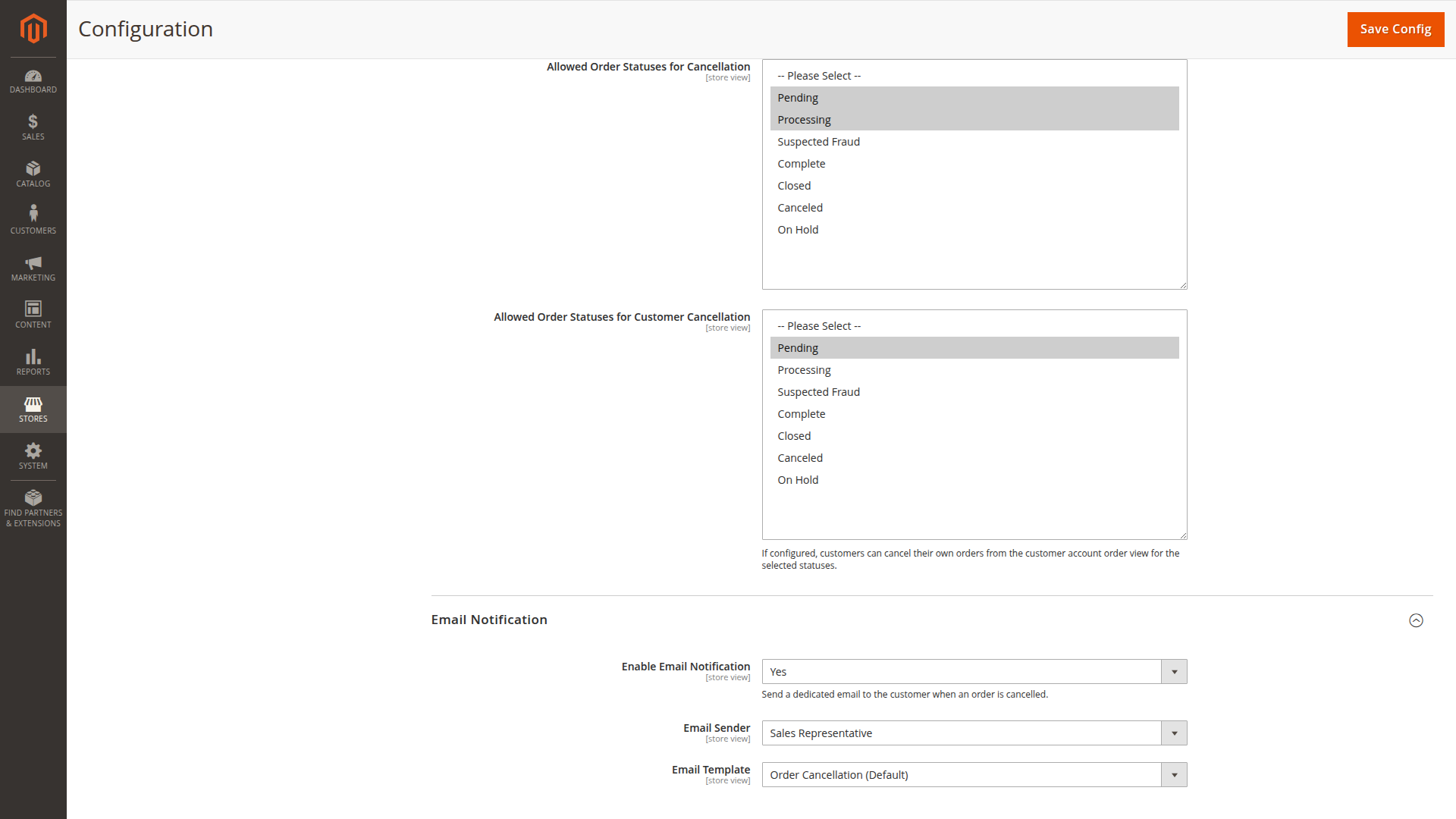
Allowed Order Statuses for Cancellation controls both Admin entry points. The button is shown on an order page only when the current status is selected. The mass action skips selected orders whose status is not allowed.
Allowed Order Statuses for Customer Cancellation controls the Cancel Order action in the customer account. Leave this list empty to disable customer self-service cancellation.
The two status lists are independent. A status allowed for Admin users is not automatically allowed for customers.
Email notification
Enable Email Notification controls the dedicated email sent to the order's customer address after cancellation.
Email Sender selects the Magento sender identity.
Email Template selects the cancellation template. The supplied template contains the customer's name and order number.
Choose statuses carefully
Start with early statuses such as the status used before fulfillment or invoicing in your store. Do not copy a generic status list into production. Payment modules and fulfillment integrations can attach different meaning to the same Magento status.
The fallback cancellation path does not refund captured money and does not create a credit memo. Test every allowed status with the payment methods used by the store.
Two separate permissions apply: Order Cancellation controls the cancel action itself, while Stores > Settings > Configuration > Order Cancellation controls access to this settings page. Grant both to roles that manage the feature.
System configuration reference
Order Cancellation / General settings (ordercancellation/general/*)
| Config path | Admin label | Type |
|---|---|---|
ordercancellation/general/comment |
Define the comment which should be set when order is cancelled through this extension. | text |
ordercancellation/general/displayed_on_frontend |
Display on frontend | select |
ordercancellation/general/customer_notified |
Customer notified | select |
ordercancellation/general/allowed_order_statuses |
Allowed Order Statuses for Cancellation | multiselect |
ordercancellation/general/customer_allowed_order_statuses |
Allowed Order Statuses for Customer Cancellation | multiselect |
Order Cancellation / Email Notification (ordercancellation/email/*)
| Config path | Admin label | Type |
|---|---|---|
ordercancellation/email/enabled |
Enable Email Notification | select |
ordercancellation/email/identity |
Email Sender | select |
ordercancellation/email/template |
Email Template | select |