
Roles, Permissions and Groups
mageb2b/sublogin-role adds reusable storefront roles and a group hierarchy. Use roles to define what a buyer may do. Use groups to represent reporting or approval relationships inside the company.
The base Sublogin package works without this add-on. Install Role only when buyers need different storefront permissions or an approval hierarchy.
Install and enable
composer require mageb2b/sublogin-role
php bin/magento module:enable MageB2B_SubloginRole
php bin/magento setup:upgrade
Open Stores > Configuration > MageB2B > Sublogin > Role settings and confirm Is Active is enabled for the intended scope.
Roles and groups solve different problems
| Object | Purpose | Example |
|---|---|---|
| Role | Reusable set of allowed storefront actions | Buyer, Approver, Catalog Viewer |
| Group | Position in a parent-child company hierarchy | Operations > Procurement |
A sublogin can be assigned to a role and a group. A group can have a parent group, which gives Order Approval a route through the organization when its group mode is enabled.
Built-in permission areas
The Role package contributes permissions for:
- product list, product details and product prices;
- adding products to cart, viewing cart and applying coupons;
- opening checkout, viewing totals and placing an order;
- viewing the wishlist;
- viewing orders and invoices;
- listing, saving and deleting Sublogin roles;
- listing, saving and deleting Sublogin groups.
The base package and installed add-ons contribute additional permissions to the same tree, such as Sublogin management, reports, Custom Catalog and order actions. The number is therefore installation-dependent. It should not be described as a fixed “30+” feature.
Create a buyer role
- Sign in as the main customer account.
- Open My Sublogin Roles.
- Create a role named for the job, such as
Procurement Buyer. - Grant product-list, product-detail and price access as needed.
- Grant cart and checkout permissions as a coherent set.
- Save the role and assign it to one staging sublogin.
- Sign in as that buyer and test navigation, direct URLs and actions.
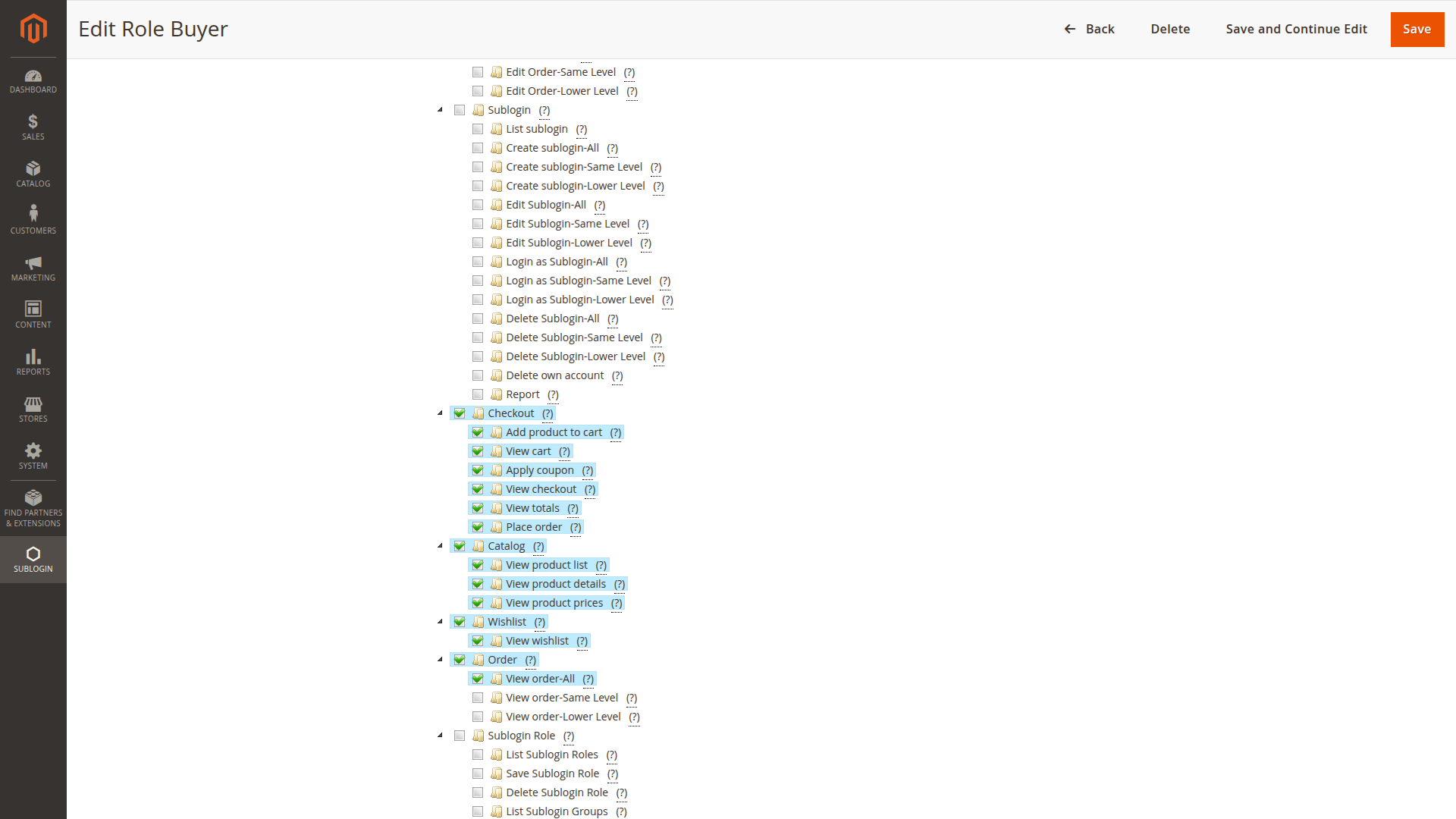
For a buyer who may place orders, grant View Checkout as well as Place Order. A permission to perform the final action is not useful if the buyer cannot reach the checkout screen.
Create a group hierarchy
- Open My Sublogin Groups.
- Create the top-level business group.
- Add child groups only where a real reporting or approval relationship exists.
- Assign each sublogin to the appropriate group.
- Review parent relationships before enabling hierarchical approval.
Keep the hierarchy shallow. A chart copied from HR often contains levels that add no value to purchasing and make approval routing difficult to explain.
Permission behavior
Permissions are enforced in storefront actions and, for supported resources, product collections and views. Test both visible navigation and direct URLs. Hiding a link alone is not an authorization check.
Some permissions are marked as group permissions. They can participate in group-aware behavior, including order and invoice visibility or approval actions, depending on the installed modules.
Role and Order Approval
Order Approval does not require Role. Without Role, an order that needs approval goes to the main customer.
With both packages installed, Final Approve/Decline order when all group approved an order can enable a group path:
- the order enters the configured pre-approval state;
- eligible users in parent groups approve it in sequence;
- the main account makes the final decision after group approval completes.
This hierarchy is based on groups, not on configurable amount tiers. The per-sublogin subtotal threshold only decides whether approval is required.
Safe role design
Start with the smallest useful roles:
- Catalog Viewer: products and prices, no cart or checkout;
- Buyer: products, prices, cart and checkout;
- Approver: order visibility plus approve or decline permissions when Order Approval is installed;
- Account Coordinator: selected role, group or sublogin management permissions.
These are examples, not roles created automatically by the package.
Avoid one-off roles for every person. Reusable roles make support and offboarding easier.
Changes and troubleshooting
After changing a role:
- save the role;
- start a fresh sublogin session;
- test the affected direct route as well as navigation;
- check whether another add-on adds its own permission;
- verify the role is assigned to the expected sublogin.
If every buyer loses access, confirm Role is active and a valid default or assigned role exists. If only one feature is missing, inspect that feature's contributed ACL permission.
Hyvä storefront
Install mageb2b/sublogin-role-hyva in addition to the base Sublogin Hyvä bridge. See Hyvä Compatibility Packages.
Related: Order Approval, Sublogin Custom Catalog, and Permission Problems.