
Budget Management
mageb2b/sublogin-budget checks a sublogin's current cart against configured spending limits. Limits can belong to the sublogin, the main account or both, and can cover a fixed period, a recurring period or one order.
Install and test Budget after the base Sublogin checkout works.
Install
composer require mageb2b/sublogin-budget
php bin/magento module:enable MageB2B_SubloginBudget
php bin/magento setup:upgrade
Choose the budget types
Open Stores > Configuration > MageB2B > Sublogin > Budget settings.
| Type | Meaning |
|---|---|
| Year | Fixed start and end within one selected year. |
| Yearly | Recurring yearly limit. |
| Month | Fixed selected month. |
| Monthly | Recurring monthly limit. |
| Day | Fixed selected day. |
| Daily | Recurring daily limit. |
| Per Order | Maximum for one order. |
The default allowed-type list includes the six period types but not Per Order. Add it under Allowed Budget Types when your buyers need an order cap.
Use a fixed type for a project or a specific accounting period. Use a recurring type for an ongoing purchasing policy.
Decide whose budget applies
Budget Logic provides five choices:
| Choice | Result |
|---|---|
| Disable | Budget validation is not applied. |
| Apply main account budget limit when no sublogin budget found. | Use the buyer's budget when present, otherwise fall back to the parent account. This is the default. |
| Apply main account budget limit and skip sublogin budget. | Ignore sublogin budgets. |
| Use sublogin budget only. | Ignore main-account budgets. |
| Combine sublogin and main account budgets. | Evaluate applicable values from both owners. |
Combined mode does not turn every record into one unrestricted total. Applicable amounts are combined by budget type and period; the effective per-order value uses the maximum applicable per-order allowance. Test the exact record combination you intend to use.
Choose what counts as spending
| Setting | Default | Guidance |
|---|---|---|
| Budget Calculation Basis | Grand total | Choose subtotal when shipping and tax should not consume budget. Choose grand total for the final payable amount. |
| Order Status for budget consideration | Processing, Complete, Closed | Only orders in selected statuses contribute to used spend. Align this list with your cancellation and payment flow. |
| Use only Pay on Budget orders for budget usage | No | When enabled, orders paid another way do not consume the tracked budget. |
Changing statuses or calculation basis changes future validation and can also change how past orders contribute to the current period. Review the effect before changing a live website.
Create and test a budget
- Choose one staging sublogin.
- Create one active Monthly budget for the current month.
- Set a round amount that makes the test easy to understand.
- Add a cart below the remaining budget and proceed to checkout.
- Place the order and move it into a status counted by Budget.
- Start a second cart that exceeds the remaining amount.
- Confirm the configured period, spent amount and exceeded amount appear in the message.
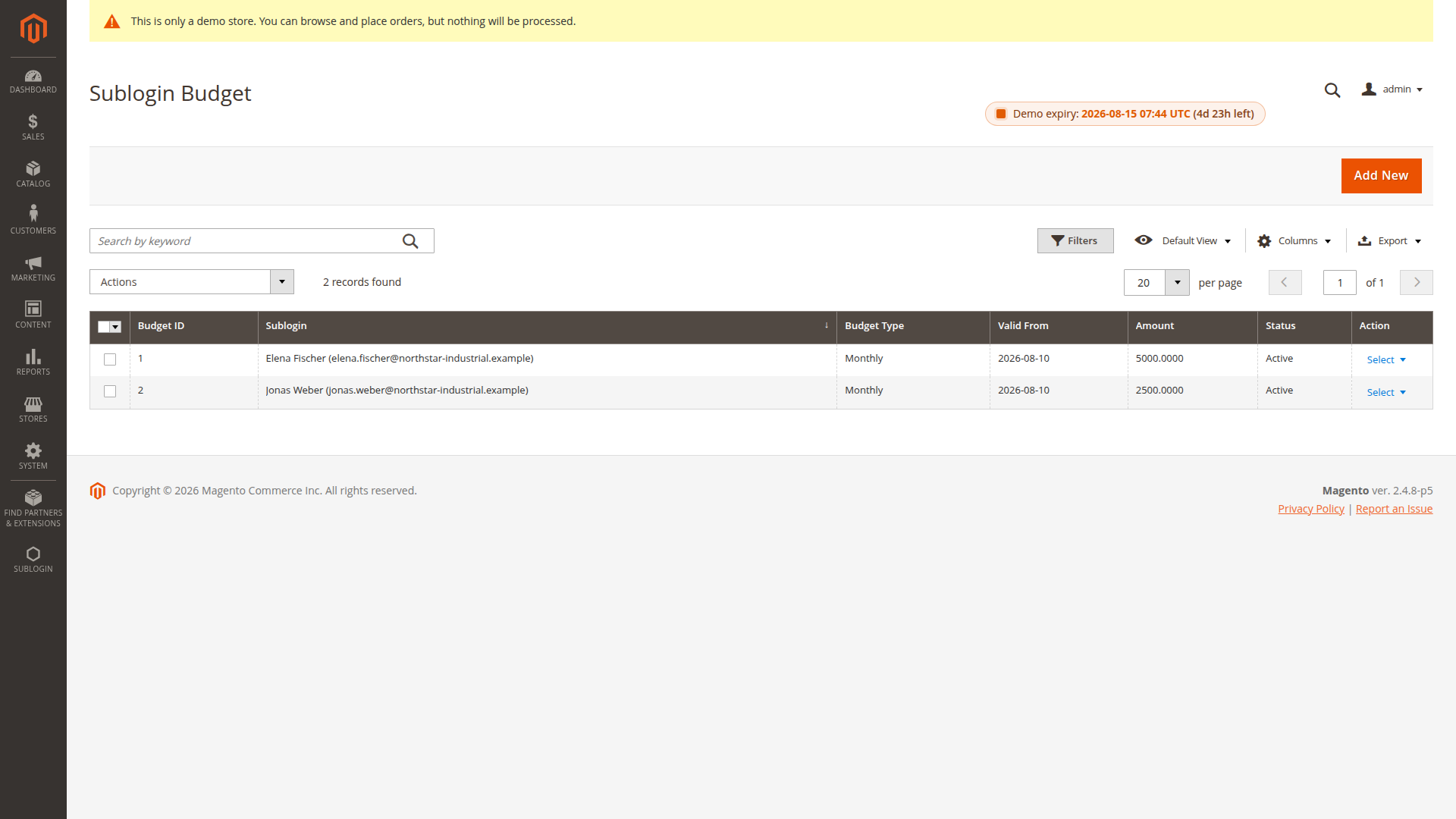
Add more periods only after this single record behaves as expected.
Checkout enforcement
Budget validates the quote during checkout. An over-budget cart is normally blocked.
When Order Approval is installed, Allow budget restricted order to checkout can send an over-budget order into the approval state instead. In that path, the sublogin's normal approval flag and threshold are ignored for the budget-restricted order.
Enable order approval on empty budget applies only to that integration and only when the sublogin is configured to need approval. Test an account with no applicable budget so the fallback is deliberate.
Budget summaries and messages
Budget summaries are disabled by default for both the sublogin and main customer. Enable the appropriate storefront summary when users should see the limit, used amount and remaining amount.
The exceeded messages support placeholders shown in Admin. Keep the wording factual and tell the buyer whom to contact. Do not expose internal IDs or approval tokens.
Pay on Budget
Pay on Budget is an offline Magento payment method and is disabled by default under Stores > Configuration > Sales > Payment Methods.
It is available only when:
- the shopper is an active sublogin;
- an applicable budget exists;
- the current cart passes budget validation;
- the method is enabled for the website and country.
Enforce Pay on Budget as only payment method when budgets are available hides other payment methods for an eligible buyer. Enable it only after confirming Pay on Budget works for every affected checkout country and address.
Expired fixed budgets
The cron job mageb2b_subloginbudget_disable_expired_budgets runs daily at 04:00 and deactivates expired fixed Day, Month and Year records. Recurring Daily, Monthly and Yearly records remain active because their period rolls forward.
Make sure Magento cron runs reliably. If a fixed record stays active after its end date, check the cron schedule and job history before editing the database.
One-time allowance
The separate mageb2b/sublogin-budget-one-time package lets the latest active one-time record override normal budgets for the next successful order. See One-Time Budget.
Integration boundary
Budget exposes PHP interfaces for code inside Magento. It does not register a REST or SOAP budget endpoint. See Budget Integration Boundary.
Hyvä storefront
Install mageb2b/sublogin-budget-hyva when the store uses Hyvä. See Hyvä Compatibility Packages.
Troubleshooting
- Used amount is zero: confirm the order reached a counted status and review Pay-on-Budget-only mode.
- The wrong total is checked: review subtotal versus grand total.
- No budget appears: check owner, type, active flag, period and Budget Logic.
- Checkout is blocked: compare the current cart with every applicable period and per-order limit.
- Pay on Budget is missing: check payment-method enablement, country, active sublogin and budget errors.
Related: Order Approval and Payment and Shipping Restrictions.