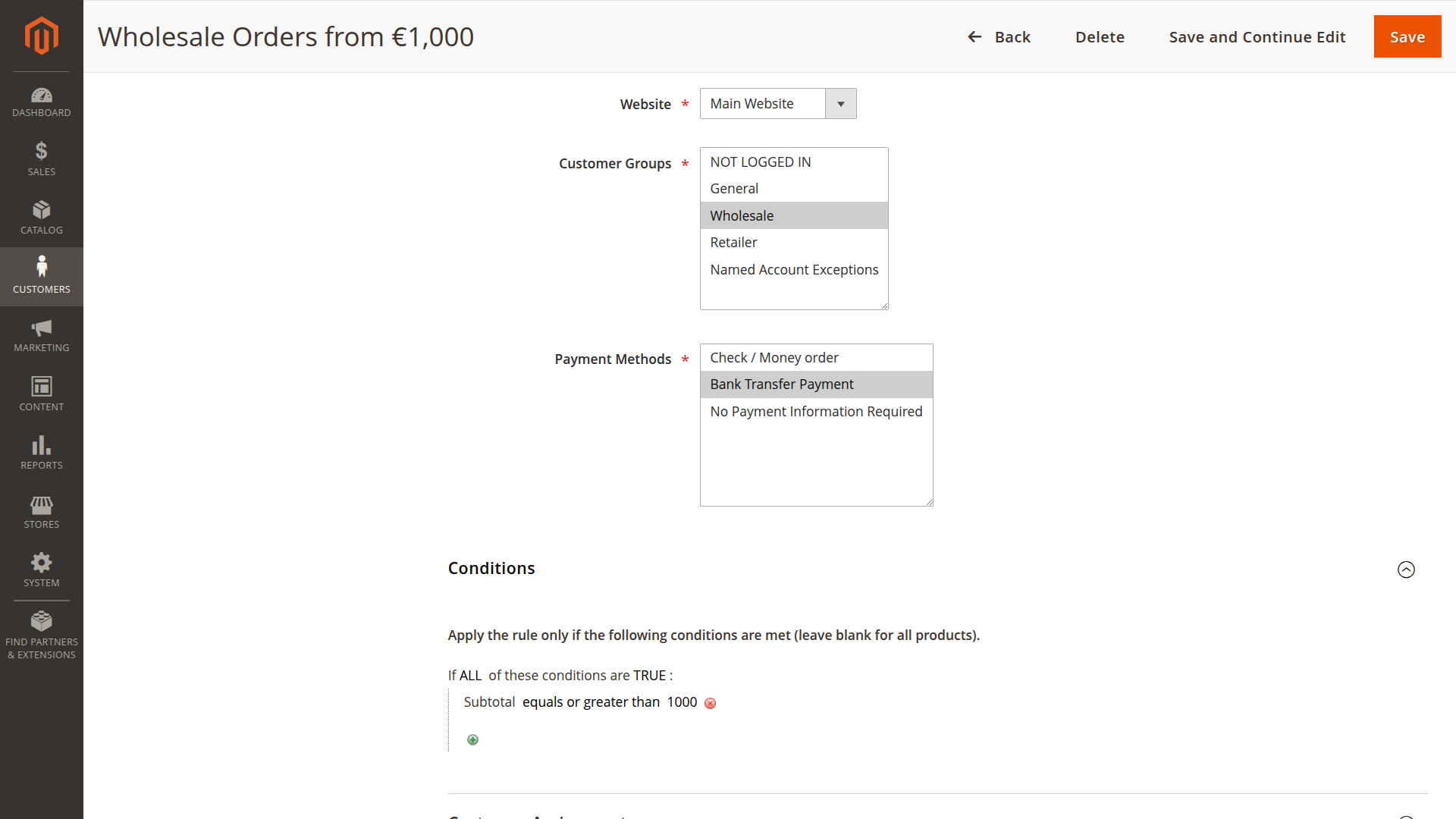
Condition Builder
The Payment Profiles extension uses Magento's powerful SalesRule condition system to create sophisticated cart and customer-based restrictions.
Screenshot placeholder: payment profile conditions section in admin File:
./_screenshots/condition-builder.png
Overview
The condition builder allows you to restrict payment methods based on:
- Cart attributes (subtotal, quantity, weight)
- Product attributes (SKU, category, price, attributes)
- Customer attributes (group, address, segments)
- Shipping attributes (country, region, method)
Accessing the Condition Builder
- Navigate to Customers >Payment Profiles
- Edit or create a profile
- Expand the Conditions section
- Click the + icon to add conditions
Condition Types
Cart Conditions
Subtotal
Restrict based on cart subtotal (before tax/shipping):
Subtotal equals or greater than 1000Use Case: Disable COD for orders over €1000
Total Items Quantity
Restrict based on total number of items:
Total Items Quantity is 10 or lessUse Case: Limit payment methods for bulk orders
Total Weight
Restrict based on total cart weight:
Total Weight equals or greater than 50Use Case: Different payment methods for heavy shipments
Product Conditions
Category
Restrict based on product categories:
Product Category is one of: Electronics, ComputersUse Case: Secure payment methods for high-value categories
SKU
Restrict based on specific SKUs:
Product SKU is one of: PROD-001, PROD-002Use Case: Special payment terms for specific products
Price
Restrict based on product price:
Product Price equals or greater than 500Use Case: Secure payment for expensive items
Attribute Set
Restrict based on attribute set:
Product Attribute Set is: ElectronicsUse Case: Category-specific payment restrictions
Customer Conditions
Customer Group
Already handled by profile assignment, but can be used in conditions:
Customer Group is one of: Wholesale, CorporateUse Case: Combined with other conditions for complex rules
Shipping Country
Restrict based on shipping destination:
Shipping Country is one of: DE, AT, CHUse Case: Region-specific payment methods
Shipping Region
Restrict based on shipping region/state:
Shipping State/Province is one of: CA, NY, TXUse Case: State-specific payment regulations
Shipping Postcode
Restrict based on postal code:
Shipping Postcode is: 10*Use Case: Local payment methods for specific areas
Condition Operators
Comparison Operators
is- Exact matchis not- Not equalequals or greater than- >=equals or less than- <=greater than- >less than- <
List Operators
is one of- In listis not one of- Not in list
String Operators
contains- Substring matchdoes not contain- Substring not match
Combining Conditions
AND Logic (ALL)
All conditions must be true:
If ALL of these conditions are TRUE: Subtotal equals or greater than 500 Shipping Country is: DE Product Category is one of: ElectronicsResult: All three conditions must match
OR Logic (ANY)
At least one condition must be true:
If ANY of these conditions are TRUE: Shipping Country is: US Shipping Country is: CA Shipping Country is: MXResult: Any North American country matches
Nested Conditions
Combine AND/OR logic:
If ALL of these conditions are TRUE: Subtotal equals or greater than 1000 If ANY of these conditions are TRUE: Shipping Country is: DE Shipping Country is: AT Shipping Country is: CHResult: High-value orders to DACH region
Practical Examples
Example 1: B2B High-Value Orders
If ALL of these conditions are TRUE: Subtotal equals or greater than 5000 Customer Group is one of: Wholesale, Corporate Shipping Country is one of: DE, AT, CHPayment Methods: Bank Transfer, Purchase Order Use Case: Secure payment for large B2B orders in DACH region
Example 2: Electronics Category Restriction
If ALL of these conditions are TRUE: Product Category is one of: Electronics, Computers Subtotal equals or greater than 1000Payment Methods: Credit Card, PayPal (no COD) Use Case: Secure payment for expensive electronics
Example 3: Regional Payment Methods
If ANY of these conditions are TRUE: Shipping Country is: DE Shipping Country is: AT Shipping Country is: CHPayment Methods: SEPA, Sofort, Credit Card Use Case: DACH-specific payment methods
Example 4: Bulk Order Restrictions
If ALL of these conditions are TRUE: Total Items Quantity equals or greater than 50 Total Weight equals or greater than 100Payment Methods: Bank Transfer, Purchase Order (no COD) Use Case: Bulk orders require advance payment
Example 5: VIP Customer Benefits
If ALL of these conditions are TRUE: Customer Group is: VIP Subtotal equals or greater than 100Payment Methods: All methods + Net 30 Use Case: VIP customers get payment terms for orders over €100
Advanced Conditions
Product Attribute Conditions
Use custom product attributes:
If ALL of these conditions are TRUE: Product Attribute [brand] is one of: Apple, Samsung Subtotal equals or greater than 500Use Case: Brand-specific payment restrictions
Customer Segment Conditions
Use Magento customer segments:
If ALL of these conditions are TRUE: Customer Segment is: High Value Customers Subtotal equals or greater than 1000Use Case: Segment-based payment benefits Note: Segment/lifetime-style conditions depend on your Magento setup and available attributes.
Shipping Method Conditions
Restrict based on shipping method:
If ALL of these conditions are TRUE: Shipping Method is: flatrate_flatrateUse Case: Different payment methods per shipping method
Condition Validation
When Conditions Are Evaluated
Conditions are validated:
- During checkout when payment methods are loaded
- When cart is updated (quantity, products)
- When shipping address changes
- When customer logs in/out
Validation Performance
- Conditions are cached per quote
- Validation is optimized for checkout usage
- No impact on catalog browsing
Debugging Conditions
Test Conditions
- Create a test profile with conditions
- Add products to cart matching conditions
- Proceed to checkout
- Verify correct payment methods are shown
Common Issues
Issue: Conditions not matching
- Check: Condition values (case-sensitive for strings)
- Check: Operator (is vs contains)
- Check: AND vs OR logic
Issue: Conditions too restrictive
- Check: All conditions must be true for AND logic
- Solution: Use OR logic or separate profiles
Best Practices
1. Keep Conditions Simple
✓ GOOD: Subtotal >= 1000 ✗ BAD: Subtotal >= 1000 AND Subtotal <= 5000 AND Category = Electronics AND Brand = Apple AND Weight >= 10 AND Country = DE2. Use Multiple Profiles
Instead of complex nested conditions, create multiple profiles with different priorities.
3. Test Thoroughly
Test conditions with:
- Edge cases (exactly 1000, not 999 or 1001)
- Different customer types
- Various cart combinations
4. Document Conditions
Add notes in profile name:
Priority 10: B2B High Value (>€5000, DACH)