
Configure Bulkgood Shipping
Open Stores > Configuration > Sales > Shipping Methods > Table Rates. Configure Magento's normal Table Rates fields first, then set the four Bulkgood options in the same section.
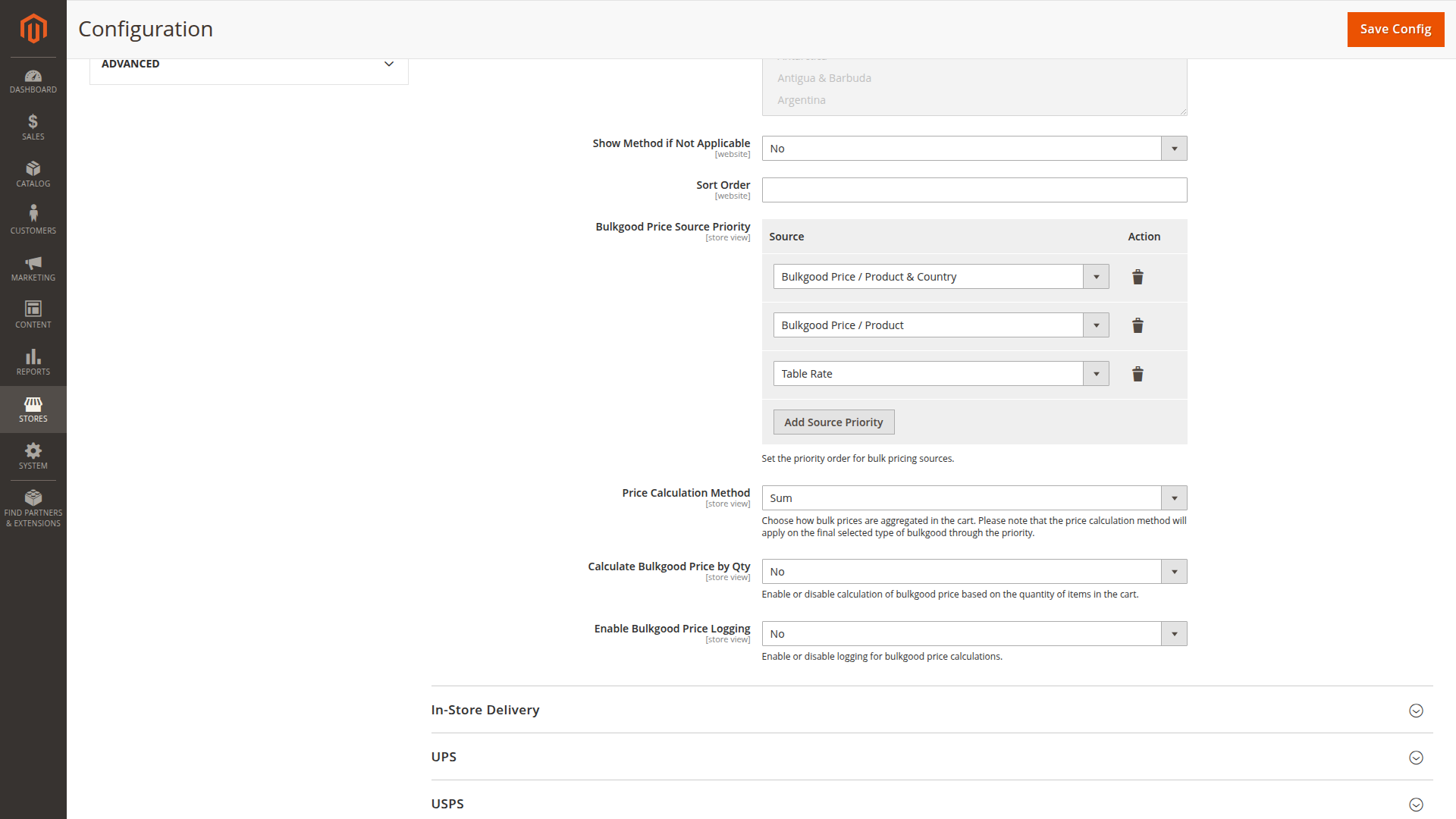
Bulkgood Price Source Priority
Add up to three sources and place them in the order in which they should be checked:
| Source | Value used |
|---|---|
| Bulkgood Price / Product & Country | Country-specific product rows that match the shipping country and active Table Rates condition |
| Bulkgood Price / Product | The general Bulkgood Price stored on bulk products |
| Table Rate | The price from the matching Table Rates row with Bulkgood = 1 |
The first source with at least one usable value wins for the bulk calculation. This is a cart-level decision, not an individual fallback for each product. For example, if the country source is first and one of three bulk products has a matching country price, that source is selected. The two products without a country price are not then filled from the general product source.
For that reason, use a product source first only when the relevant products are priced consistently through that source.
Price Calculation Method
This setting combines values from the selected product source:
- Sum adds all available values.
- Highest uses the largest available value.
- Lowest uses the smallest available value.
- Average uses the arithmetic mean.
It does not combine ordinary and bulk table rates, and it does not change a single Table Rates price.
Calculate Bulkgood Price by Qty
When enabled, each country-specific or general product price is multiplied by that item's quantity before the calculation method runs. The option does not multiply the price returned by the Table Rates source.
Example with Sum:
| Product | Price | Quantity | Contributing value |
|---|---|---|---|
| Storage cabinet | 45.00 | 2 | 90.00 |
| Workbench | 70.00 | 1 | 70.00 |
| Shipping price | 160.00 |
Enable Bulkgood Price Logging
Enable this temporarily when a checkout result does not match your expectation. Entries are written through Magento's standard logger and normally appear in var/log/system.log. The log records the configured source order, product price candidates, selected source and final amount.
Disable it again after troubleshooting to avoid unnecessary log volume.
Scope
The four fields are available at default, website and store-view scope. Magento's Table Rates import and export is website-scoped, while the Bulkgood product attributes are website-scoped product values. Confirm both the configuration scope and the product website assignment before comparing storefront results.
A safe first configuration
The shipped defaults already enable all three price sources in the priority list, use Highest as the calculation method and multiply by quantity — the steps below deliberately narrow that to a predictable starting point.
For a catalog in which every bulk product has a general freight price:
- Bulkgood Price / Product
- Table Rate
Use Sum if each product contributes freight, or Highest if the most expensive handling requirement should determine the charge. Import a broad Bulkgood = 1 row for every served destination, even though the visible amount comes from the product.
For a centrally managed weight or subtotal matrix, place Table Rate first and manage the amount entirely in the CSV.
Configuration reference
| Config path | Admin label |
|---|---|
carriers/tablerate/bulkgood_price_priority |
Bulkgood Price Source Priority |
carriers/tablerate/price_calculation_method |
Price Calculation Method |
carriers/tablerate/calculate_by_quantity |
Calculate Bulkgood Price by Qty |
carriers/tablerate/log_enabled |
Enable Bulkgood Price Logging |
Continue with your first bulkgood product and the Table Rates setup.