
Customer History Add-On
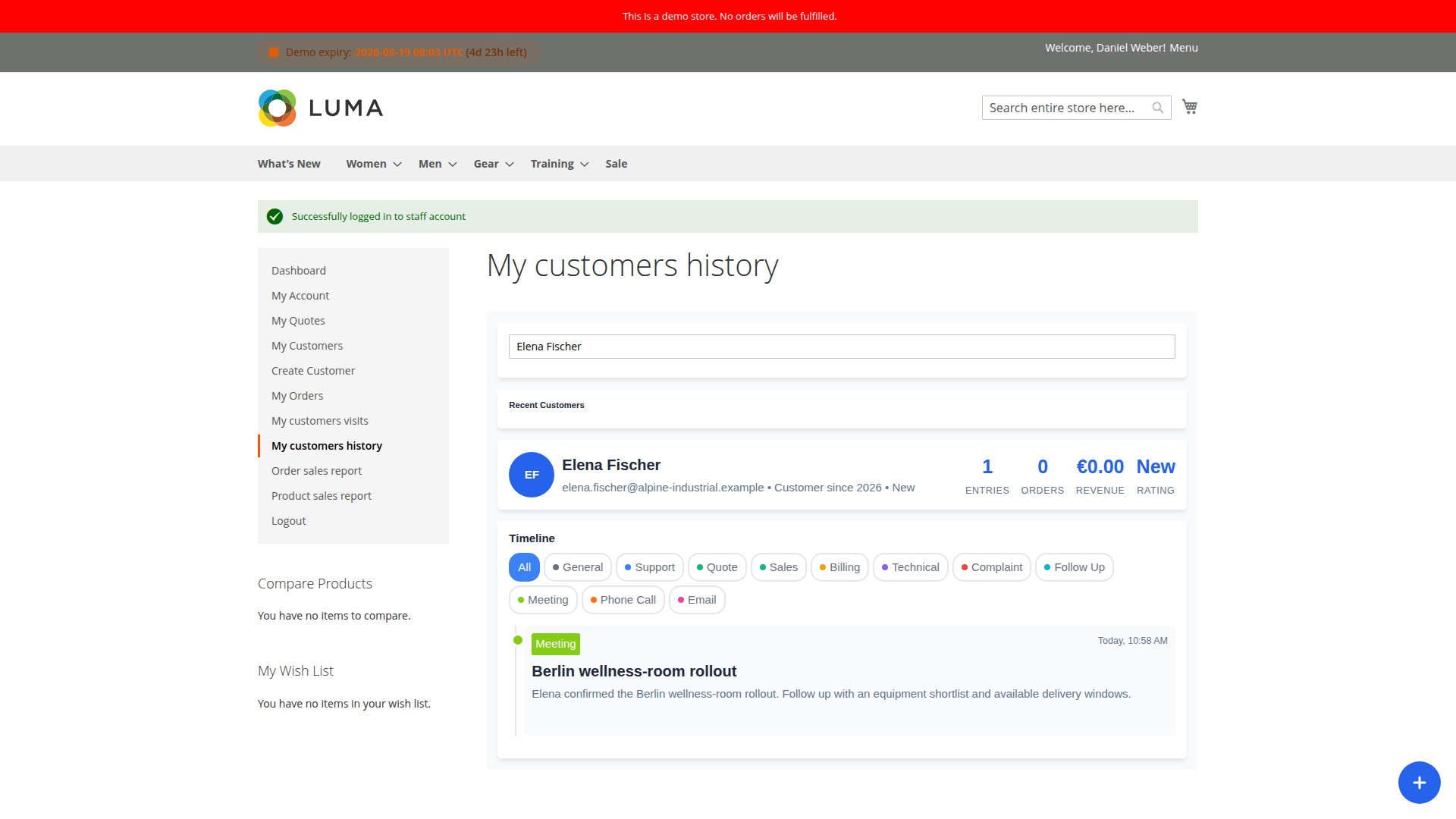
Customer History gives representatives a shared, structured timeline for their customer work. Instead of keeping call notes, meeting outcomes and files in personal inboxes, Staff users can record them against the Magento customer they belong to.
Install
composer require mageb2b/staff-customerhistory:*
php bin/magento module:enable MageB2B_StaffCustomerHistory
php bin/magento setup:upgrade
php bin/magento setup:di:compile
php bin/magento cache:flush
What representatives can record
An entry contains a customer, topic, title, description and timestamp. Files may be attached, and an entry can be sent to the customer using the configured email template. Staff can list all entries, find recent customers, duplicate an entry and, when allowed, delete their own entries.
The default topics include General, Support, Quote, Sales, Billing, Technical, Complaint, Follow Up, Meeting, Phone Call and Email. Edit this list under Stores > Configuration > MageB2B > Staff > Customer history so it matches the language your sales and service teams actually use.
Each Staff account has a Manage Customer History permission. A representative still needs access to the selected customer; the add-on does not bypass customer assignments.
Optional order entries
Enable Add order history as customer history if placing an order in Staff context should create a timeline entry automatically. It is disabled by default. Leave it off when order records already provide enough detail or when the extra entries would obscure meaningful conversations.
Customer ratings
Rating rules use order count and revenue. Rules are evaluated from top to bottom and the first match wins. The shipped rules classify customers as Premium, Gold, Silver, Bronze or New; the fallback rating is New.
Put the most selective rule first. After changing thresholds, test a high-value customer, a new customer and a customer exactly on a boundary.
Attachments
The default extension allowlist is pdf,doc,docx,odt,xls,csv,jpg,jpeg,png, the default storage path is customer_history, and the default limit is five files per entry. The per-file size setting is empty by default, which means the effective system limit applies.
For production, set a deliberate maximum size, keep the extension list narrow and include the upload directory in your backup and retention plan.
Configuration reference
| Setting | Default | Effect |
|---|---|---|
| Add order history as customer history | No | Creates a timeline entry when Staff places an order |
| Available Topics | Eleven preset topics | Controls topic codes, labels and colors |
| Customer Rating Rules | Preset JSON rules | Evaluates order count and revenue from top to bottom |
| Default Rating | New | Used when no rule matches |
| Allowed Extensions | Document, spreadsheet and image list | Limits accepted file suffixes |
| Base path | customer_history |
Relative media storage directory |
| Filesize | Empty | Maximum MB per file; empty uses the system limit |
| Maximum Files Per Entry | 5 | Caps attachments on one entry |
| Staff can delete history entries | Yes | Lets a Staff user remove their own entries |
The email template is configured as Email template to send history email alert to customer under the Staff email settings.
If an entry or file is missing
- Confirm the Staff account has Manage Customer History enabled.
- Confirm the customer is assigned to that representative.
- Check the allowed extension, file count and effective upload-size limit.
- Verify that Magento can write to the configured media path.
- If email is the only missing part, check that the history template is active and inspect the Magento mail transport and logs.
Related: Customer Assignment and Customer Visits.