
Configure Quick Order
Open Stores > Configuration > MageB2B > Quick Order. Choose the correct website or store-view scope before saving changes.
General Settings
- Enable Quick Order controls the storefront feature.
- Allow Guests lets unsigned visitors use the Quick Order page.
- Allowed Customer Groups limits signed-in access. Leave it empty to allow every customer group.
- Maximum Items limits the number of order rows. Enter
0for no module-specific limit. - Maximum Item Quantity limits each row's quantity. Enter
0for no module-specific limit.
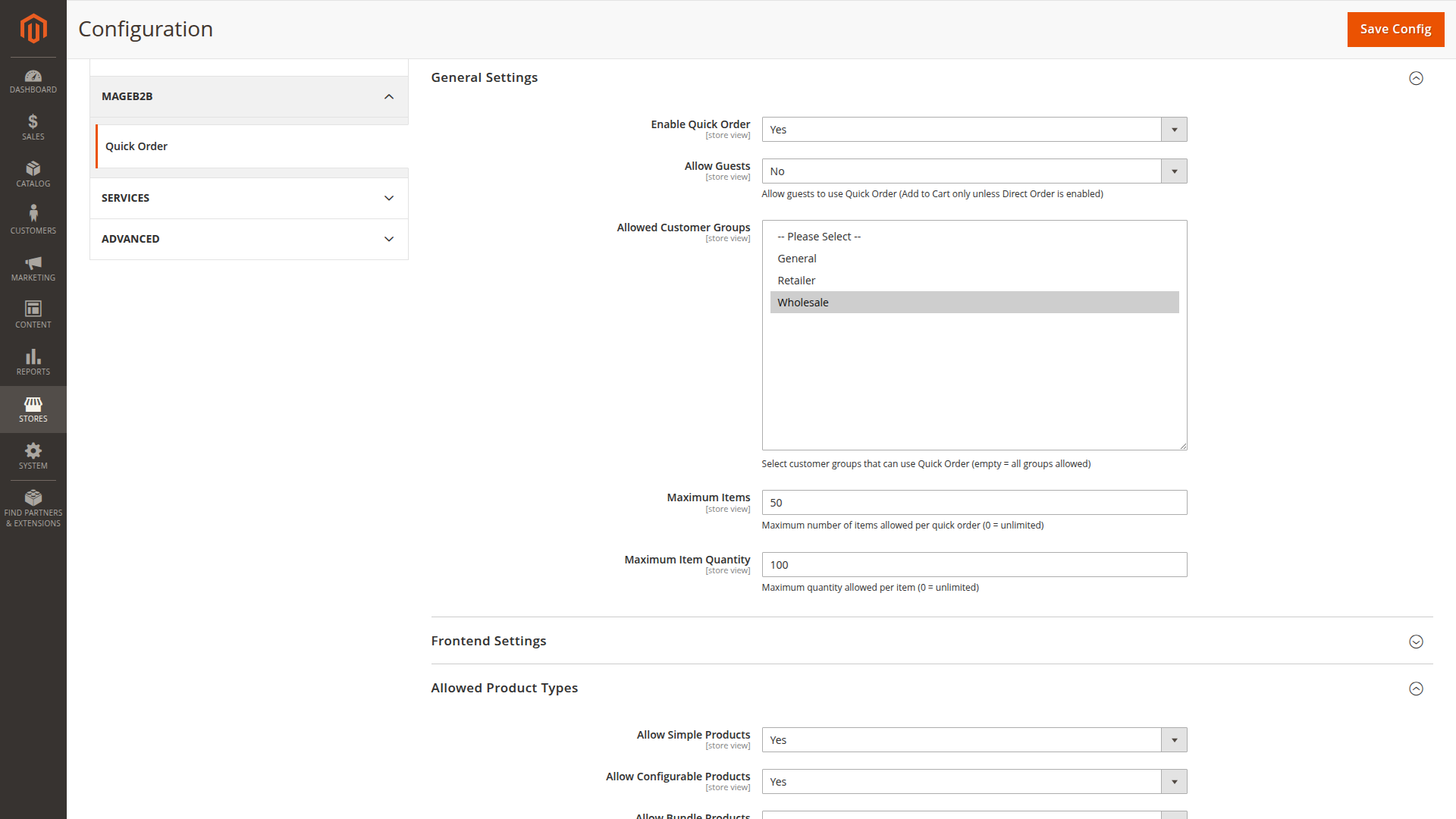
Magento's normal catalog, stock and quantity rules still apply even when the module limits are unlimited.
Frontend Settings
Choose where buyers can find Quick Order by enabling the top-navigation, customer-account or footer link. A disabled link does not by itself disable the /quickorder route; the general and access settings decide whether the page is available.
You can also control:
- prices and tier-price hints
- product images and product-type badges
- the minimum number of characters before search starts
- the number of products shown per page in Browse Catalog
If prices are hidden, buyers can still prepare rows when the rest of the workflow permits it. Test this choice with the same customer groups and price rules used in production.
Allowed Product Types
Enable simple, configurable and bundle products separately. Disabled types are excluded from search and rejected during import or submission.
Configurable and bundle products require valid option selections. See Configurable and Bundle Options.
CSV Import
- Enable Bulk Import shows the paste and upload workflow.
- CSV Delimiter must contain one character and match the buyer's file.
- Default Import Mode chooses whether imported rows are added to the current list or overwrite matching rows.
The buyer sees a preview before the rows are applied. Exact columns and examples are in CSV Import.
Order Actions
Allow Add to Cart and Allow Direct Order are independent. Enable at least the action you want buyers to use, then select the default action shown on the page.
Direct Order has additional decisions:
- Allow Guest Direct Order applies only when guest page access is also enabled.
- Require Shipping Method makes a shipping choice mandatory for orders that need shipping.
- Require Payment Method makes a payment choice mandatory.
- Restore Previous Cart After Quick Order preserves a buyer's earlier cart while a temporary Direct Order cart is used.
- Prompt When Cart Is Not Empty lets the buyer decide how to proceed when the normal cart already contains items.
Guest page access and guest Direct Order permission are deliberately separate. A guest may be allowed to prepare items and add them to the cart without being allowed to use Direct Order.
Recommended first rollout
Start with one customer group and Add to Cart. Verify search visibility, prices, imports and product options. Enable Direct Order after addresses, shipping and payment have been tested with your actual store configuration.
Continue with First Quick Order.